Tongyi Qwen · Qwen-Image-Edit · qwen-image-edit

Qwen Image Edit — change one line of text without regenerating the whole frame

  • Appearance + semantic editing
  • CN/EN in-image text changes
  • Chinese poster editable
  • Local changes, rest stays put

What is Qwen Image Edit?

Tongyi Qwen's instruction image editing tier. Edit CN/EN text on existing images, add/remove objects, outfit and IP derivatives—while preserving font style and non-target areas as much as possible.

Developer
Tongyi Qwen (Qwen / Alibaba)
Product line
Qwen-Image-Edit instruction editing (from ~Aug 2025)
Resolution
Not specifiable · defaults ~follows input
Input / output
1–3 input images · fixed 1 output
In-image text
CN/EN add/change/delete · preserve font style
On iMini
Browser · free quota · no API key

Appearance and semantic editing in one channel

Add/remove objects, outfit and background swaps are appearance editing; IP derivatives, rotate viewpoint, style transfer are semantic editing. Client wants one change but you regenerate whole frame—deadline gone.
CN/EN in-image text changes are hard requirements

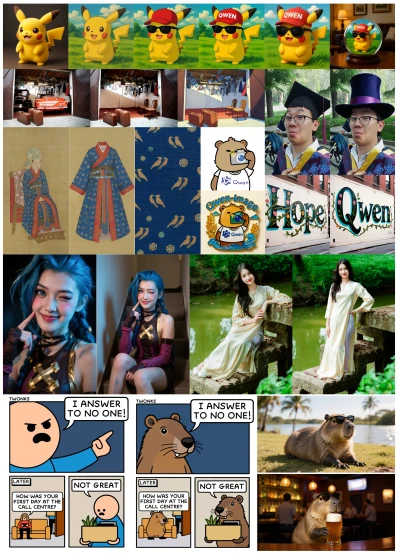
Graffiti wall Hope→Qwen, Chinese poster headline swaps—all editable; text right but style drifted still fails review. Specify what font and decoration to preserve in prompts.

Chinese posters & calligraphy chain fixes

Official demos include Chinese poster fine-type edits and calligraphy wrong-character step-by-step box fixes—miss one rare character, whole calligraphy piece undeliverable.

Local edit, rest stays put

Appearance editing emphasizes non-target area preservation; identity drift kills whole series hero images. With multi-image input, name "image 1/image 2" explicitly to avoid wrong asset reference.

What the model actually delivers

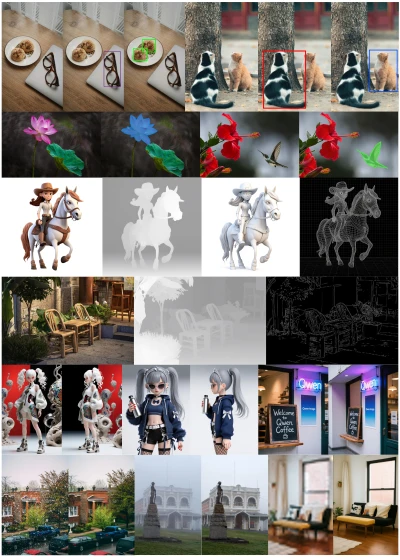
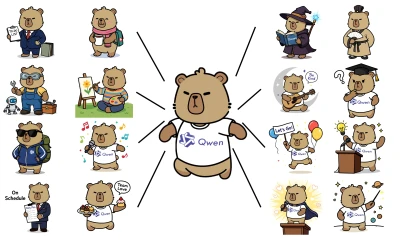
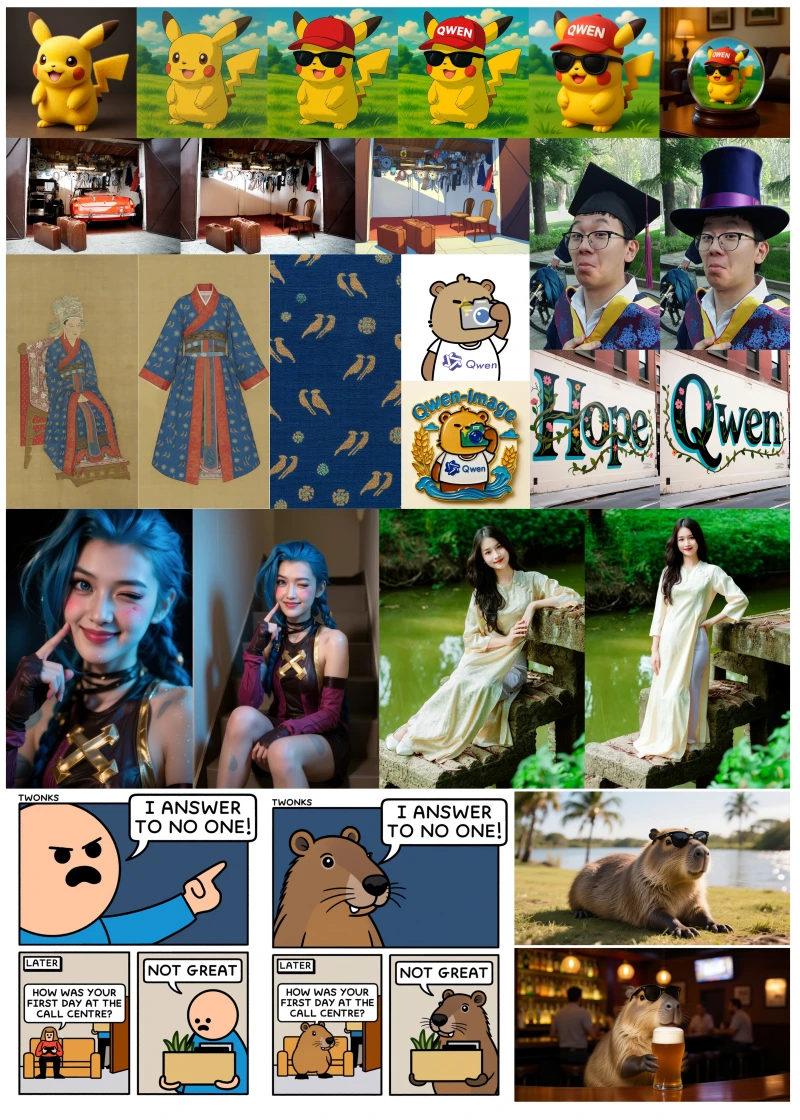
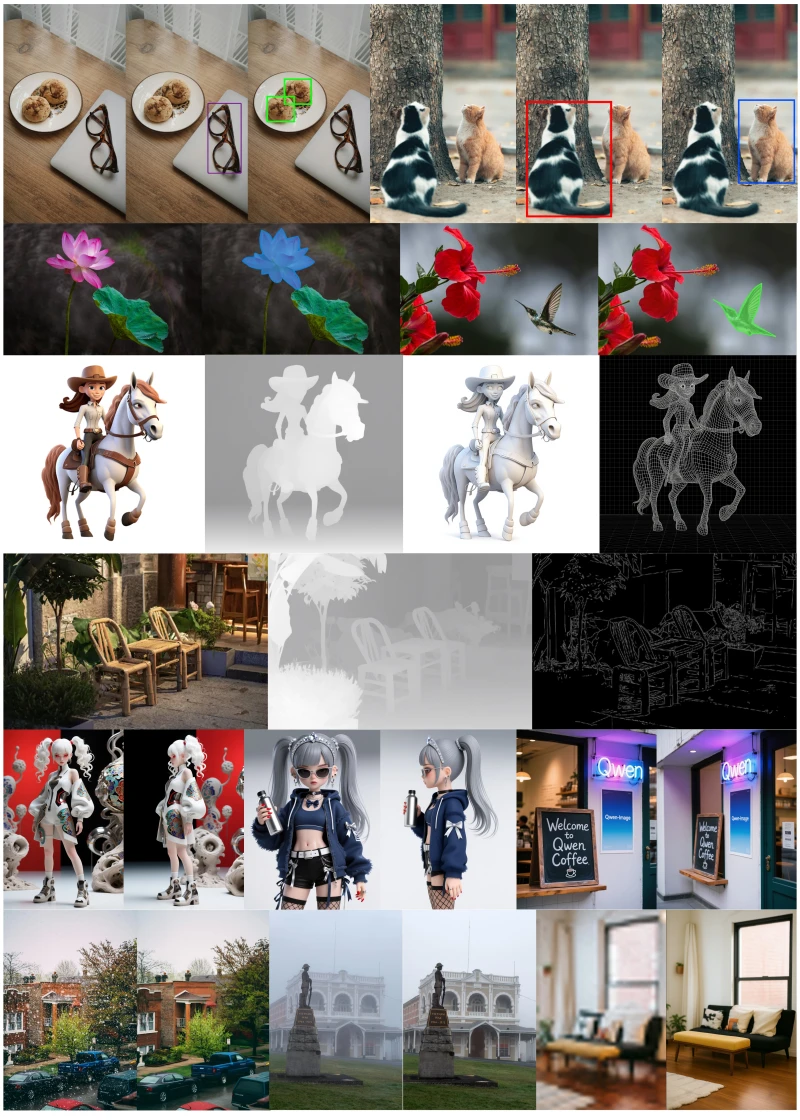
Official / Bailian demos: text add/remove, local recolor, IP multi-look, pattern on merch, figurine, multi-image character compositing—check "what changes, what stays."

Edit capability collage: add/remove / Hope→Qwen text change / comic character swap
Local recolor, multi-view consistency & scene rewrite collage
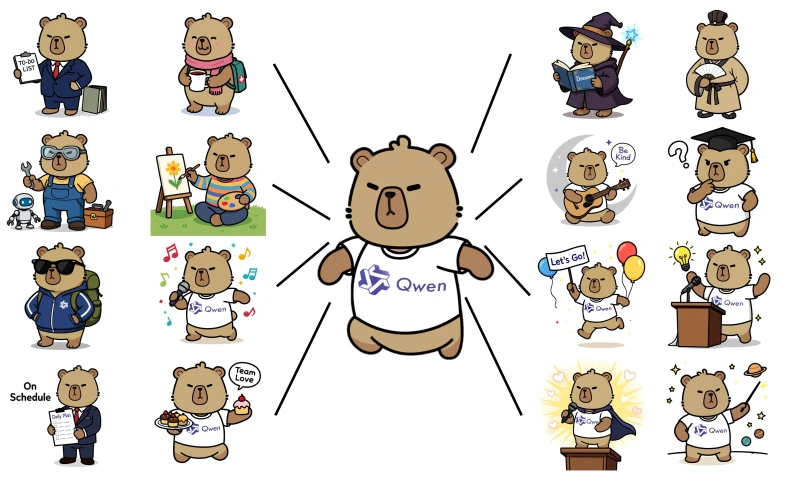
IP semantic edit: same character multi-look derivatives
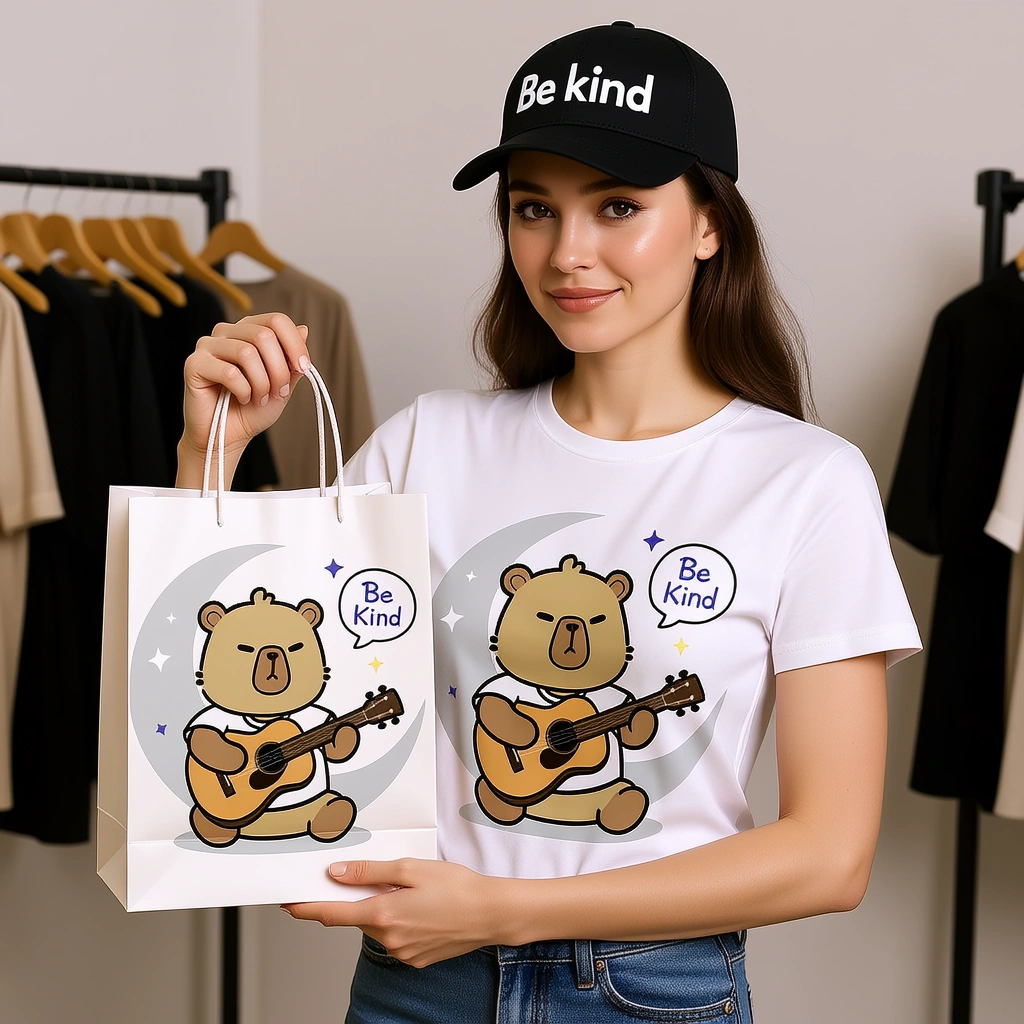
Pattern on T-shirt and tote bag (Be Kind)
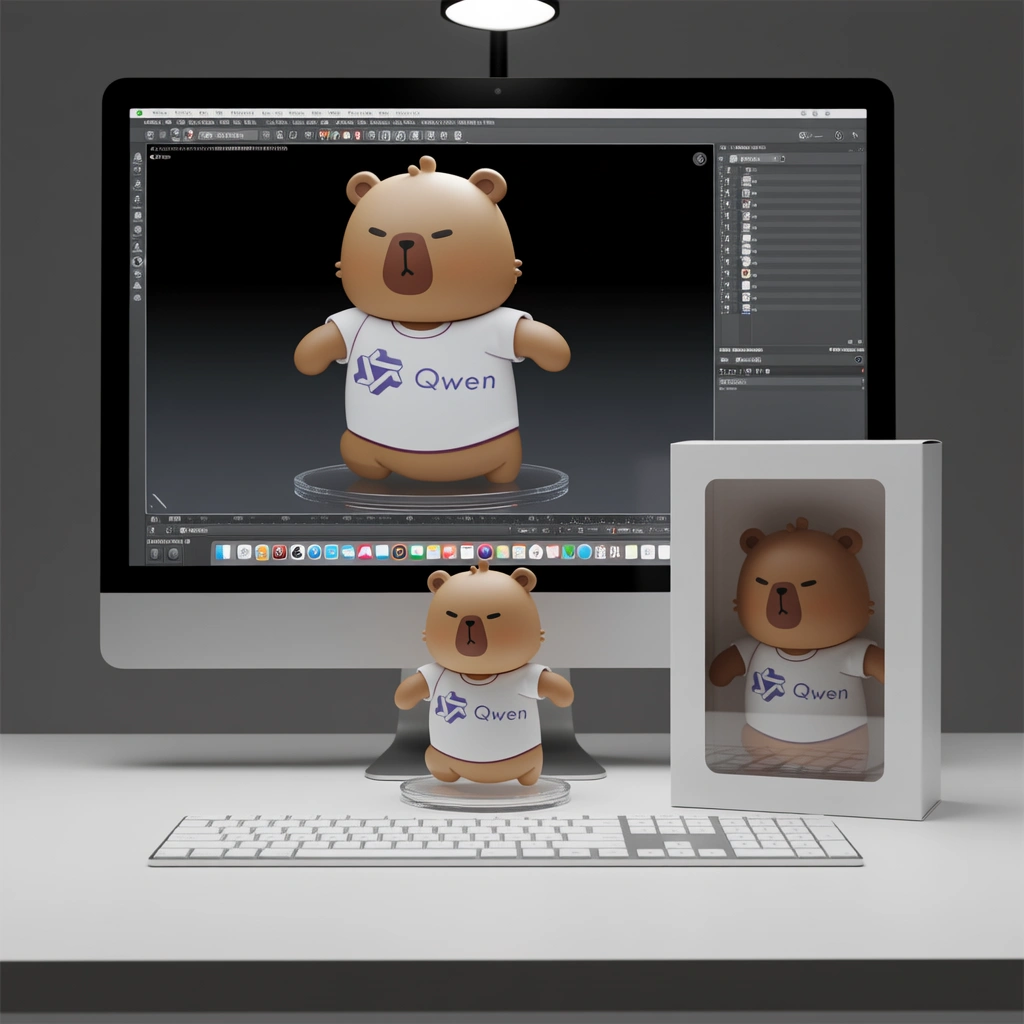
Character figurine productization (desk display)
Multi-image fusion character compositing (official example input)

How it stacks against today's top models

Vs Plus, Wan 2.7, GPT Image 2. Editing default Edit; from-scratch long copy Plus; ~2K generate+edit Wan 2.7; OpenAI stack GPT Image 2.

DimensionQwen Image EditQwen Image PlusWan 2.7GPT Image 2
EditingInstruction editing · add/change/delete textMainly text-to-image (no editing this tier)Instruction editing · add/change/delete textInstruction editing · add/change/delete text
In-image textShort copy readable · text editableComplex CN/EN long copy (text-to-image)Short copy readable · text editableShort copy readable · text editable
Local precisionShort copy readable · text editableShort copy usableShort copy readable · text editableShort copy readable · text editable
ResolutionSize not specifiable · defaults ~follows input (≈1K)Fixed presets, ~1K–1.5K class (five tiers)Up to ~2KNative 4K (3840×2160)
Chinese supportStrong Chinese text supportStrong Chinese text supportStrong Chinese layout · editableMulti-reference support
Reference / input images1–3 input imagesNo image input (text-to-image only)Multi-reference supportMulti-reference support
Speed profileQuality-first · not instant draftQuality-first · not instant draftQuality-first · not instant draftFaster output
Default pickPrecise editing & CN text change defaultChinese posters & long copy firstWan generate+edit default (standard tier)OpenAI new-project default

Where Qwen Image Edit shines

Text changes, add/remove, identity stays put, Chinese posters fixable—these differentiate it from pure text-to-image channels.

Instruction-driven appearance & semantic editing

Natural language specifies what to change and keep; full regeneration loses locked lighting and composition.

CN/EN in-image text add/change/delete

Graffiti, posters, sign text changes; drifted font style still makes brand mock unusable.

Chinese fine type & calligraphy fixes

Chinese poster small type and wrong-character chain box fixes; miss one character, whole piece undeliverable.

Add/remove objects & local cleanup

Add sign/remove clutter/swap hat; non-target area drift doubles retouch rounds.

Style transfer & viewpoint semantic editing

Ghibli-style conversion, rotate to back view, IP multi-look; semantic drift breaks character series alignment.

Multi-image fusion & outfit pose transfer

1–3 inputs for outfit swap, pose transfer; wrong image index reference, wrong subject in result.

Six review-ready production workflows

Mapped to this page's samples: text changes, local add/remove, IP derivatives, pattern on merch, figurine productization, multi-image character fusion—not generic "make it prettier."

CN/EN in-image text changes

CN/EN in-image text changes

Graffiti Hope→Qwen, poster headline swap; text right but style drifted still fails review.

Add/remove objects & local recolor

Add/remove objects & local recolor

Remove car keep garage, petals to blue, add top hat; rest of frame changes too—equals redo.

IP / character multi-look

IP / character multi-look

Same mascot derivative career looks; face and brand color drift kills whole sticker pack.

Pattern on physical products

Pattern on physical products

Print illustration on T-shirt and paper bag with model; wrong perspective and folds make e-commerce hero untrustworthy.

Productization & display stills

Productization & display stills

Character to figurine, packaging and screen modeling comparison; wrong scale fails pitch review.

Multi-image fusion outfit / compositing

Multi-image fusion outfit / compositing

Character compositing + scene base fusion; wrong "image 1/image 2" reference, wrong subject placement.

Teams that need one change, not full regen

Default to Edit when: you already have review-ready original, only changing text, props, or local area—failure cost is locked frame and schedule.

E-commerce & DTC

Hero clutter removal, background swap, price tag text; full regen every SKU eats schedule.

Designers & art

Change text and props on locked composition, then decide Plus re-gen or other polish channel.

Marketing & brand

Campaign visual headline changes, localization text swap; drifted font style kills ad materials.

Creators

IP multi-look, comic character swap, sticker series; identity drift breaks update rhythm.

Agencies

Fewer full redos when client changes one line or prop; side-by-side Plus / Wan / GPT comparison.

Retouch & imaging

Clutter cleanup, local recolor, outfit trials; skin and light fully drifted equals reshoot.

Three steps to run Qwen Image Edit

Step 1

Open the Qwen Image Edit entry

Select Qwen Image Edit (qwen-image-edit) in iMini's image workspace—same account as Plus, Wan, GPT Image.

Step 2

Upload source and specify change / keep

Upload 1–3 images; specify what to change and keep; multi-image use "image 1/image 2" labels; quote text to change.

Step 3

Generate, verify, chain local fixes

Verify keywords and identity; box-select local areas for more rounds if needed. From-scratch long-copy posters—switch to Plus.

4 ready-to-use edit prompts

Matched to this page's capabilities. Hover for full text, one-click copy; always specify preserve areas and text to change.

Graffiti text change

Preserve wall brick texture, lighting, and vine decoration style, only change graffiti text from "Hope" to "Qwen", match original graffiti stroke weight, do not change surrounding plants or wall stains.

Local add/remove
Local add/remove

Preserve face, clothing, and background unchanged, only replace graduation cap with purple Victorian top hat, natural brim-to-head ratio, do not change expression or pose.

IP multi-look
IP multi-look

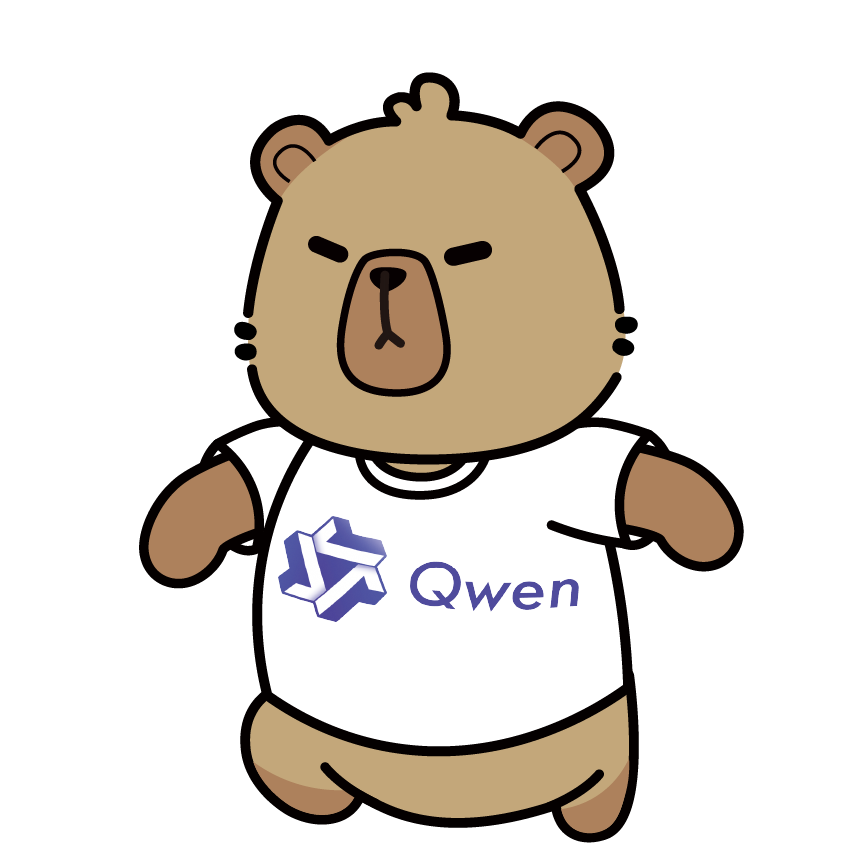
Keep this Qwen bear's face shape, colors, and T-shirt logo unchanged, change to business look in suit carrying briefcase, still signature dot eyes, white background, flat illustration style.

Pattern on merch
Pattern on merch

Print this guitar-playing bear pattern on white T-shirt and white paper tote bag, female model holding tote facing camera, black baseball cap reading "Be Kind", clothing store background blurred, keep pattern clear and readable.

Using Qwen Image Edit on iMini

Before generating: free quota, vs Plus, how many input images, resolution, text-change positioning.

Yes. Use iMini's Qwen Image Edit creation entry. Quota follows your iMini plan—no separate vendor API key needed. This page does not list Alibaba per-image pricing.

Use Qwen Image Edit free on iMini

Instruction text changes · add/remove objects · 1–3 inputs—compare side-by-side with Plus, Wan 2.7, GPT Image 2.

Generate free on iMini

No vendor API key—iMini account is enough.