
Top 8 iMini Agent Prompts for Better YouTube Hooks in 2026
July 22, 2026
AI-generated content is no longer scarce. The problem for creators is that audiences now see more automated titles, more recycled scripts, and more videos that sound polished but empty. That makes the first few seconds of a YouTube video even more important. A hook has to prove that the video is specific, useful, and worth staying for.
The opportunity is not to let AI produce more generic openings. The opportunity is to use iMini Agent as a planning system: research the viewer, define the promise, create several hook angles, connect the best one to a thumbnail, and check whether the final version still sounds human.
These eight prompts are built for that workflow. They are written as direct instructions you can paste into iMini Agent, then customize with your topic, audience, tone, and production format.
Top 8 iMini Agent Prompts for YouTube Hooks
1. Build a Hook Strategy From One Raw Idea
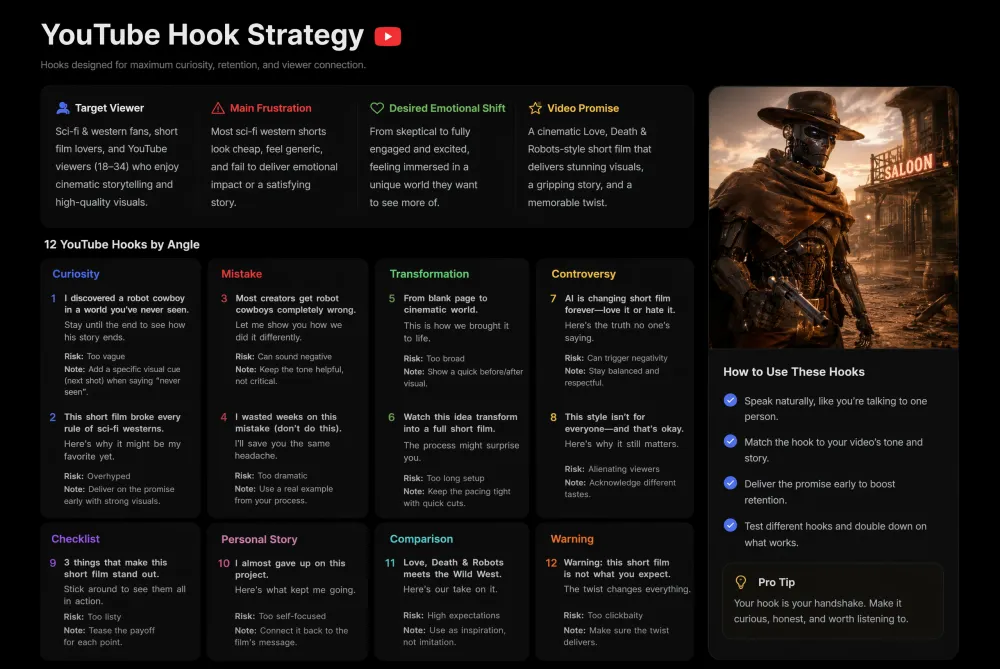
A strong YouTube hook is not a decorative opening line. It is a compact strategy: who the viewer is, what tension they already feel, what promise the video makes, and why the next few seconds matter. This prompt asks iMini Agent to turn a topic into a hook map before writing final lines, so the creator can compare angles instead of guessing.
Use iMini Agent to turn [video topic] into a YouTube hook strategy. Define the target viewer, the main frustration, the desired emotional shift, and the video promise. Then generate 12 hooks grouped by angle: curiosity, mistake, transformation, controversy, checklist, personal story, comparison, and warning. For each hook, include the first spoken sentence, the second sentence that leads into the video, the retention risk, and one note on how to make it sound more natural.
2. Design a Shorts Hook for the First Second
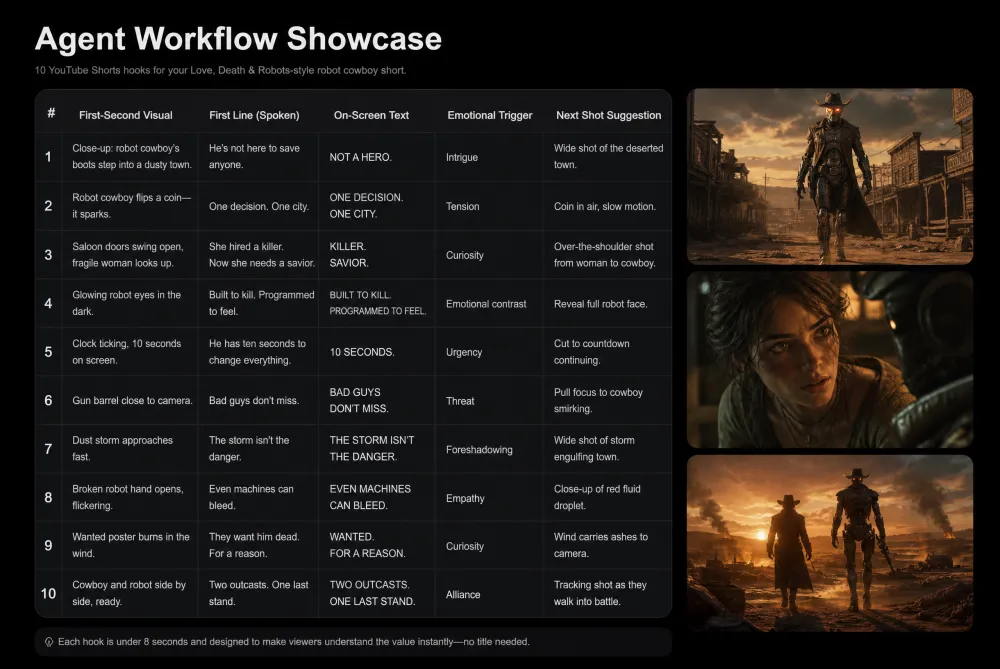
Shorts do not give creators much room to warm up. The first second must combine a visual trigger, a sentence that feels specific, and a reason to keep watching. This prompt is useful when AI-generated feeds feel crowded and the creator needs a hook that is visual, fast, and easy to film.
Use iMini Agent to create 10 YouTube Shorts hooks for [video topic]. Each hook must fit within 8 seconds and include: the first visual action, the first spoken sentence, one on-screen caption, the emotional trigger, and the next shot. Avoid vague openings such as 'you need to know this.' Make every hook specific enough that a viewer understands the payoff without reading the title.
3. Rewrite Weak Openings for Retention
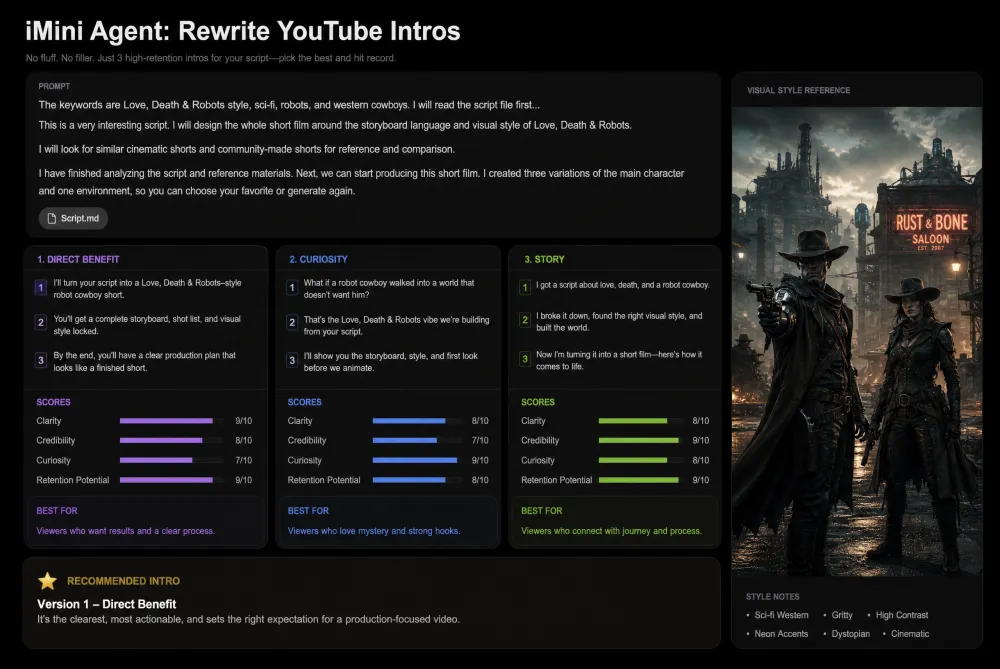
Many videos lose viewers because the opening explains too much before creating a reason to care. This prompt turns a draft intro into a tighter retention asset. It keeps the creator's voice but removes filler, front-loads the stakes, and explains why the rewrite is stronger.
Use iMini Agent to rewrite these YouTube openings: [paste openings]. Keep the creator's natural tone, but remove filler, delays, and generic phrases. For each rewrite, provide three versions: direct, curiosity-led, and story-led. Then score each version for clarity, credibility, curiosity, and retention potential. Finish with the version most likely to keep the target viewer watching.
4. Pair Titles With Hooks Before Filming
A title gets the click, but the hook must confirm that the click was worth it. When the title and opening line are disconnected, viewers feel tricked and leave. This prompt makes iMini Agent design both together, so the video promise stays consistent from search result to first sentence.
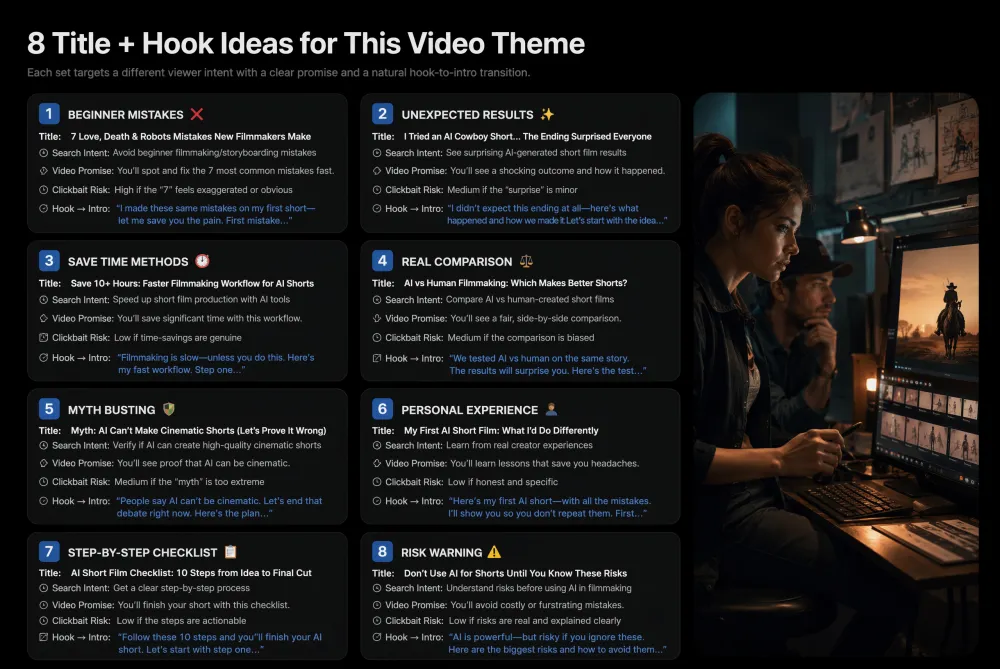
Use iMini Agent to create 8 title-and-hook pairs for [video topic]. Build one pair for each angle: beginner mistake, surprising result, faster method, honest comparison, myth-busting, personal experience, step-by-step checklist, and urgent warning. For every pair, explain the viewer intent, the promise, the possible clickbait risk, and how the hook should transition into the first section of the video.
5. Turn the Hook Into Thumbnail Concepts
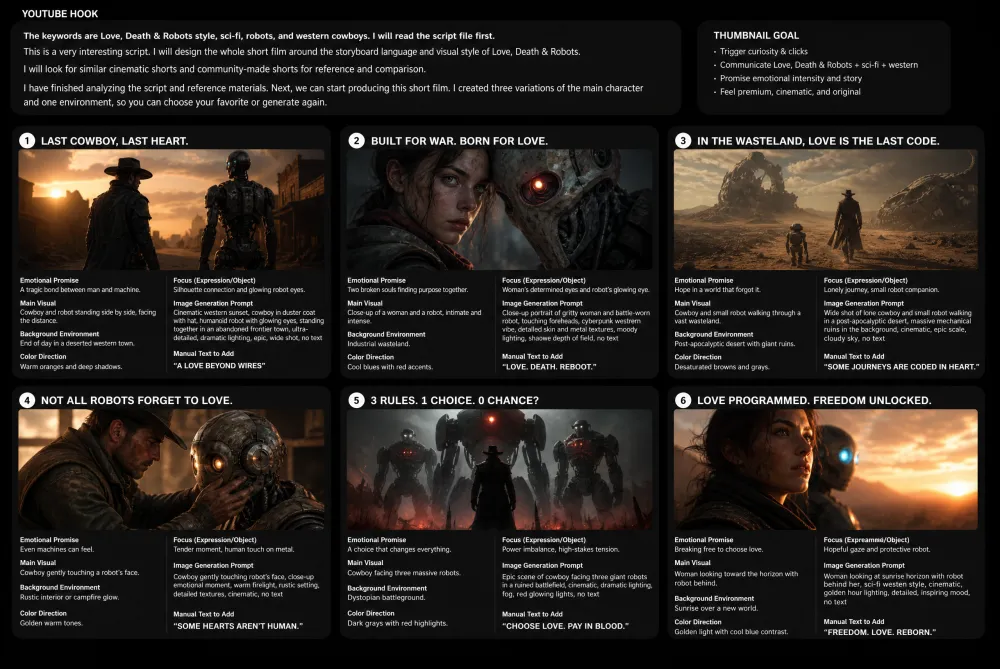
The best hook often has a visual twin. If the opening promises surprise, the thumbnail should create the same tension without making false claims. This prompt connects copy and image direction, which is where iMini becomes more useful than a plain text generator.
Use iMini Agent to turn this YouTube hook into 6 thumbnail concepts: [hook]. For each concept, include the emotional promise, main subject, background environment, color direction, facial expression or object focus, image-generation prompt, and the text that should be added manually after generation. Keep all text out of the generated image itself unless I explicitly ask for it.
6. Map Audience Triggers Before Writing
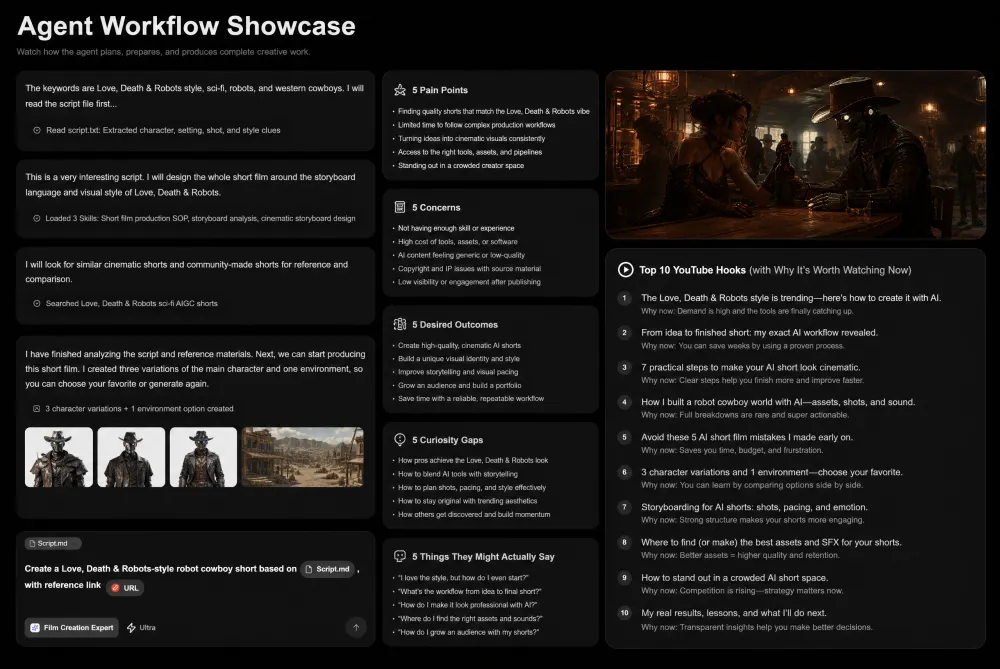
Generic hooks usually come from generic audience assumptions. This prompt forces the agent to define what the viewer wants, fears, doubts, and misunderstands before creating openings. It is especially helpful for tutorial, product review, AI tool, and creator education videos.
Use iMini Agent to analyze [target audience] for a video about [video topic]. Identify 5 pain points, 5 objections, 5 desired outcomes, 5 curiosity gaps, and 5 phrases this audience might actually use. Convert those findings into 10 YouTube hooks. Each hook should clearly state why the video matters now and should avoid exaggerated claims.
7. Repurpose One Idea Into Platform-Native Hooks
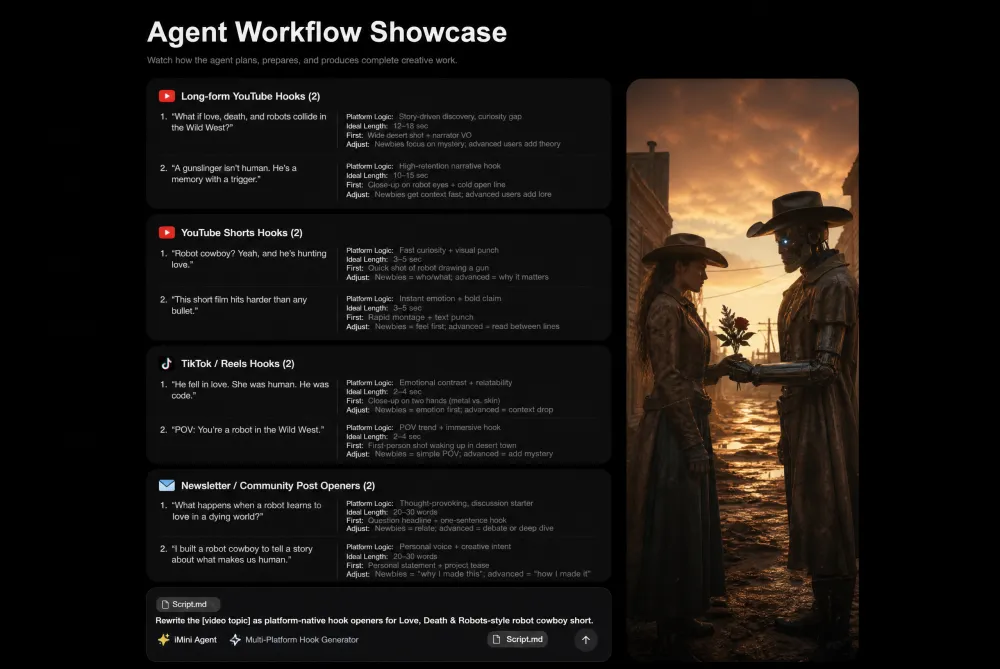
A long-form YouTube hook cannot simply be copied into Shorts, Reels, or a newsletter. Each format has a different attention pattern. This prompt helps creators keep one central idea while changing the hook structure for each platform.
Use iMini Agent to repurpose [video topic] into platform-native openings. Create 2 hooks for long-form YouTube, 2 for YouTube Shorts, 2 for TikTok or Reels, and 2 for a newsletter or community post. For each hook, explain the platform logic, the ideal length, the first visual or first sentence, and what should be changed if the audience is beginner versus advanced.
8. Quality-Check Hooks Before Publishing
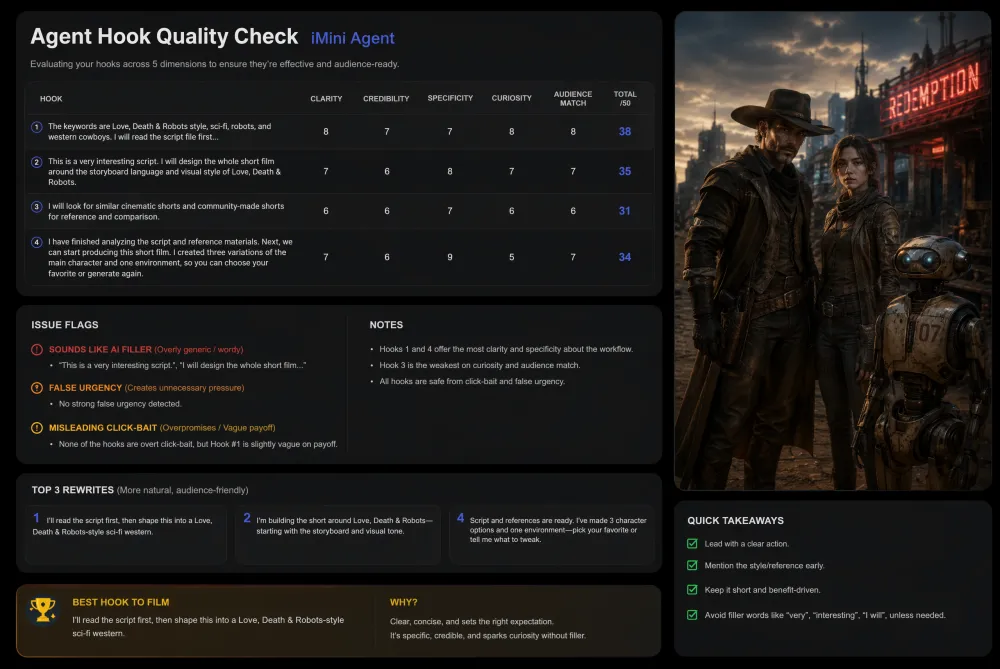
AI can generate many hooks quickly, but quantity is not the goal. A final quality check prevents the article, video, or script from sounding synthetic. This prompt asks the agent to judge hooks the way a viewer would: clear, believable, relevant, and worth the next few seconds.
Use iMini Agent to quality-check these hooks: [paste hooks]. Score each hook from 1 to 10 for clarity, credibility, specificity, curiosity, and audience fit. Flag anything that sounds like generic AI copy, fake urgency, or misleading clickbait. Rewrite the best 3 hooks in a more human voice, then recommend the strongest one for filming and explain why.
How to Use These Prompts
Start with one real video idea, not a broad niche. Add the target viewer, the problem they care about, the level of expertise, and the emotional tone you want. Then ask iMini Agent for multiple angles and compare them before filming.
The deeper workflow is to move in stages: hook strategy, title pairing, thumbnail direction, Shorts adaptation, and quality check. This keeps the hook connected to the rest of the creative package instead of leaving it as a single isolated line.
About iMini
iMini is an AI creation platform for turning ideas into images, videos, copy, and creator workflows. With iMini Agent, creators can plan YouTube hooks, generate thumbnail prompts, adapt ideas into Shorts, and polish campaign-ready content in one connected workflow.
FAQ
Why should creators use an agent for hooks?
An agent can connect the hook with audience research, title testing, visual direction, and repurposing. That makes the result more strategic than a single generic opening line.
What makes a YouTube hook feel less AI-generated?
Specificity, believable stakes, natural language, and a clear connection to the actual video. A good hook should sound like a creator with a point of view, not a template.
Can these prompts be used for Shorts?
Yes. Several prompts are designed for short-form video, where the first visual and first sentence need to work together immediately.