ChatGPT 图片编辑提示词:30+ 个可复制修图命令
搜索意图更新:修图提示词要写成清晰指令
好用的 ChatGPT 修图提示词不是一句风格描述,而是一条清楚的编辑指令:要改什么、保留什么、最后用在什么场景。
| 用户意图 | 页面应补充 | SEO/GEO 价值 |
| ChatGPT image editing prompts | Move copyable commands and preservation rules higher on the page. | Answers prompt-copy intent and improves AI Overview extractability. |
| ChatGPT image generator command | Add command-style examples for background, product photo, portrait, and ad creative edits. | Captures command wording from rising queries. |
| GPT Image 2.5 prompts | Link to GPT Image 2.5 guide and the Flare tool. | Connects prompt traffic to current model/tool intent. |
| AI photo editor prompts | Add commercial examples: ecommerce, social ads, thumbnails, and landing page hero images. | Pulls the page toward higher-value commercial traffic. |
FAQ:ChatGPT 修图提示词
ChatGPT 修图提示词怎么写更稳定?
先写编辑任务,再写需要保留的主体细节,然后写背景、光线、风格、用途和避免事项。
这些提示词适合商品图吗?
适合。商品图提示词要优先保护形状、logo、标签、颜色、材质和比例,再让模型更换场景。
快速答案:好用的 ChatGPT 图片编辑提示词怎么写
最稳的 ChatGPT 图片编辑提示词,要同时写清楚改哪里、保留什么、目标背景或风格是什么、最终图片用在哪里。这样 AI 更像是在做可控修图,而不是重新生成一张相似图片。
| 修图任务 | 必须保留 | 可复制命令 |
| 换背景 | 人物/产品、边缘、光线方向 | 只替换背景为干净影棚场景,主体保持不变。 |
| 产品图 | logo、标签、颜色、材质、比例 | 做成适合电商主图的干净产品图,保留真实阴影。 |
| 人像精修 | 身份、脸型、皮肤纹理、表情 | 优化光线并清理干扰物,但人物保持自然真实。 |
相关工作流:换背景需求看 ChatGPT 换背景提示词,精准修图看 图片编辑命令写法,实际生成可使用 GPT Image 2。
更新于 2026 年 7 月 14 日
如果你正在找可以直接复制使用的 ChatGPT 图片编辑提示词,这篇 2026 更新版可以直接当作提示词库。 这里覆盖 AI 图片编辑、GPT Image 2 提示词、换背景、人像精修、电商产品图、灯光修复、物体移除和创意风格转换。
ChatGPT 和 GPT Image 2 已经可以理解自然语言修图命令。你不一定要打开复杂的修图软件,只需要上传图片,说明想改哪里、保留什么、最终用途是什么,就能得到更干净、更适合发布的版本。关键不是简单说“让它更好看”,而是清楚写出主体、编辑区域、风格、光线、使用场景和必须保留的细节。
快速总结:把这篇文章当作 AI photo editor prompt 库使用。先明确修图任务,再说明不应改变的部分,然后用 iMini 的 GPT Image 2 工具测试换背景、人像精修、产品图清理、社媒配图和创意改图。
这篇文章主要承接高意图修图搜索。当前更值得抓的方向是换背景、AI 修图、人像精修、产品图清理、ChatGPT photo editor 工作流和 GPT Image 2 prompts。下面的提示词都按“保留主体 + 明确修改 + 说明用途”的方式写,用户可以直接复制测试。
如果你想先看完整修图流程:可以先读 ChatGPT Photo Editor 使用教程。本篇主要作为可复制的提示词合集使用。
- 重点关键词:ChatGPT 图片编辑提示词、AI 修图提示词、GPT Image 2 prompts、换背景 prompt、人像精修提示词。
- 推荐流程:上传图片,粘贴一条提示词,查看结果,再一次只微调一个细节。
- 相关教程:GPT Image 2 vs GPT Image 1 对比。
2026 年 ChatGPT 图片编辑如何工作?
使用ChatGPT编辑图片,只需上传照片并用自然语言描述你想进行的更改即可。ChatGPT能理解详细的文字提示,并智能解读指令,生成更新后的图片版本。
为了获得最佳效果,请使用清晰且具体的提示词,包含主体、视觉风格、光线、需要编辑的区域、背景或环境,以及希望添加、移除或优化的元素等关键细节。避免使用"让它更好看"这类模糊描述,精确的表达才能让AI生成最贴近预期的结果。以下是我们整理的ChatGPT图片编辑提示词供参考。
30+ 个可复制的 ChatGPT 图片编辑提示词
基于时间的图片编辑
基于时间的图片编辑提示词远不止基本的滤镜调整,要求AI随时间推移真实地重新评估光线条件、表面材质、天气效果和环境变化。这类提示词特别适合季节性营销活动、叙事插图,以及传达生存、孤立或蜕变等强烈情感的视觉内容。优质的原始素材为AI提供坚实的视觉基础,使其能精准模拟时间流逝对场景的影响。
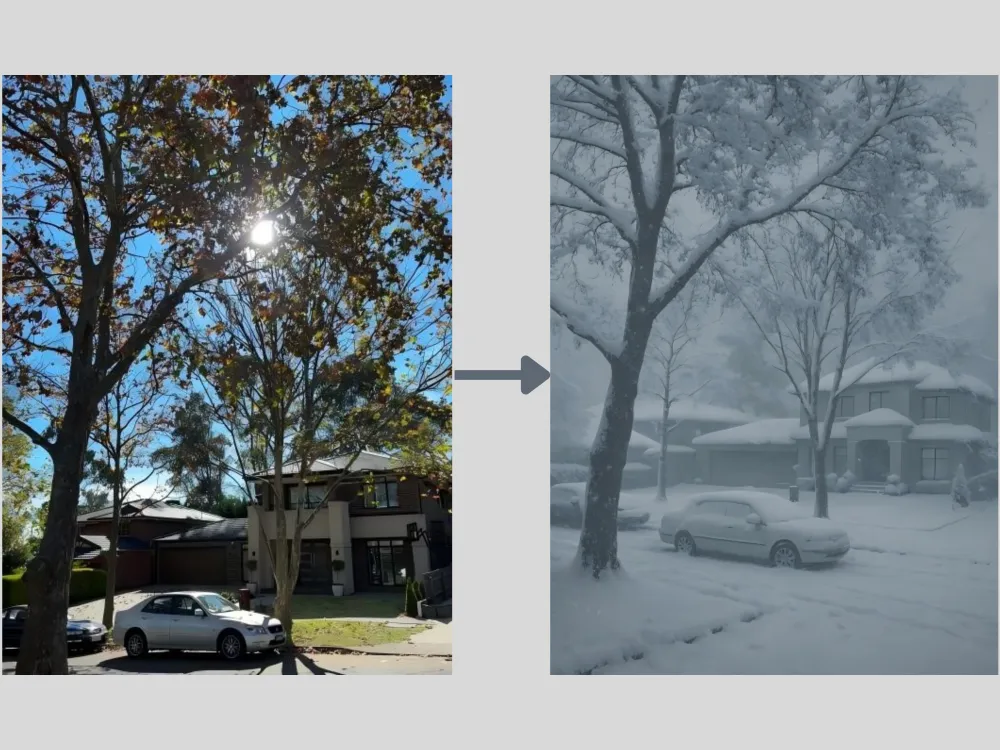
Season Change Prompt: "Transform this sunny summer street scene into a deep winter blizzard. Add heavy, realistic snow accumulation on the rooftops, cars, and tree branches. The atmosphere should be overcast, cold, and foggy, with snowflakes actively falling.
免费生成试试→
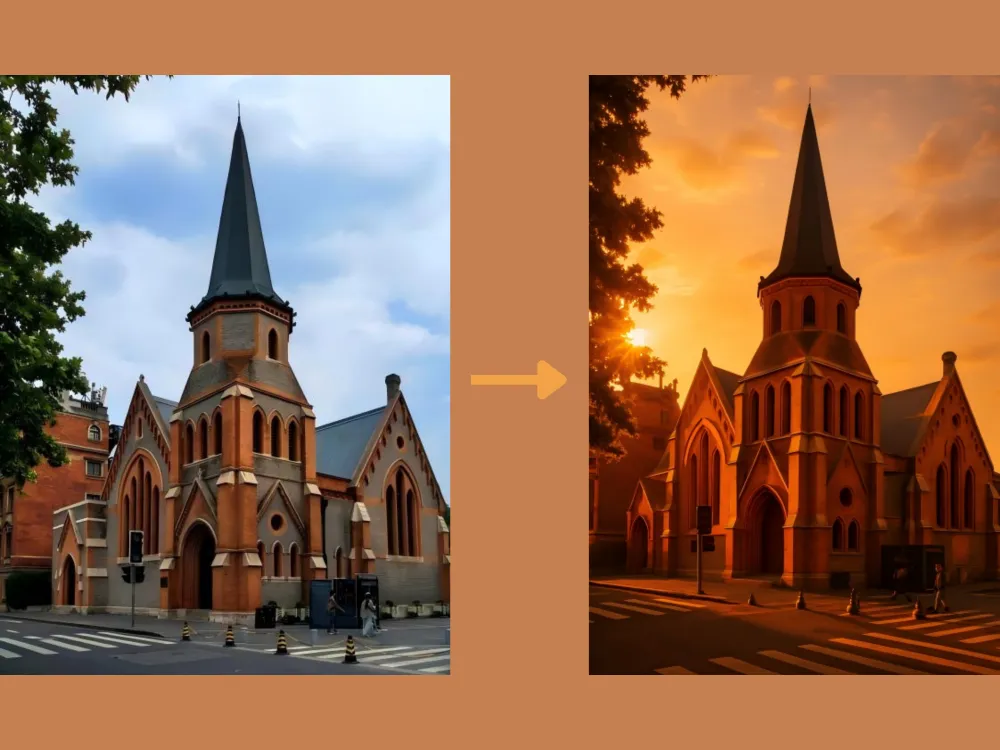
Golden Hour Relighting Prompt: "Completely re-light this image to take place during 'golden hour' sunset. The light source should come from the back-left, creating long, dramatic shadows and adding warm, rim lighting to the edges of the main subjects and buildings."
免费生成试试→
风格迁移
风格迁移是指分析并重现参考图像的艺术特质。AI会解读笔触纹理、色彩和谐、视觉节奏及构图美学等元素。通过ChatGPT,你可以将照片转换为动漫、复古、游戏等多种创意风格,同时保留原始主体。为获得最佳效果,建议上传风景图片或人物、角色的清晰生活照。
Photo to Ghibli Prompt: "Redraw this photograph in the beautiful hand-painted anime style of Studio Ghibli. Focus on soft watercolors, lush clouds, gentle color palettes, and a sense of nostalgic warmth, while keeping all original elements prominent."
免费生成试试→
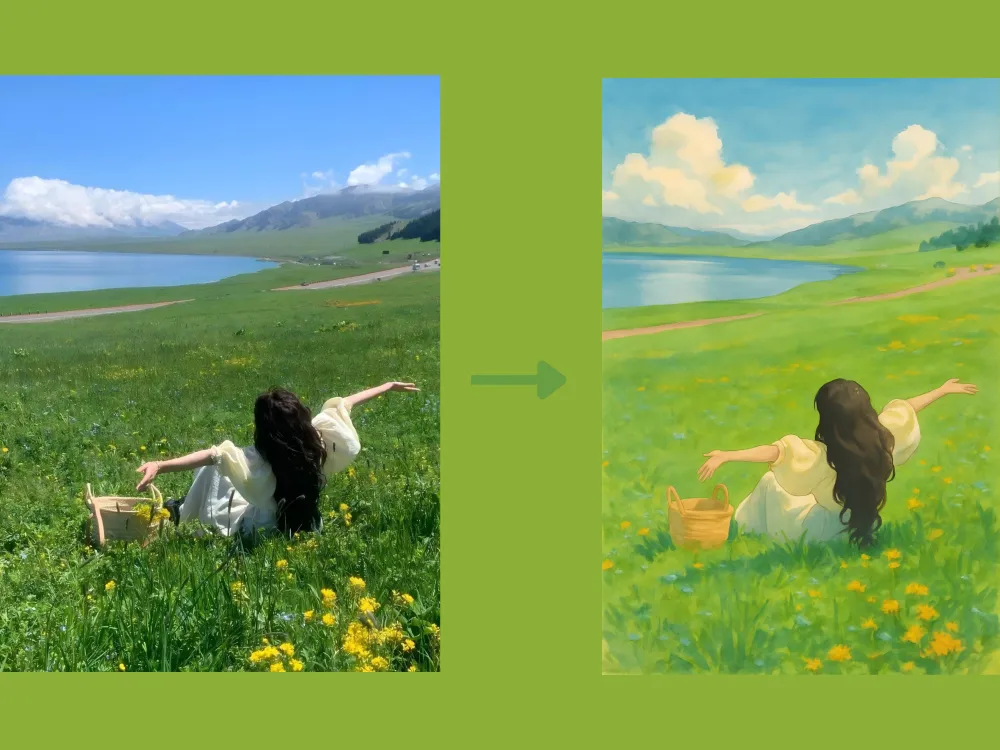
Photo to Oil Painting Prompt: "Transform this portrait into a 17th-century Dutch Golden Age oil painting. Apply rich, deep colors, dramatic chiaroscuro lighting, and visible, textured brushstrokes across the entire canvas."
免费生成试试→
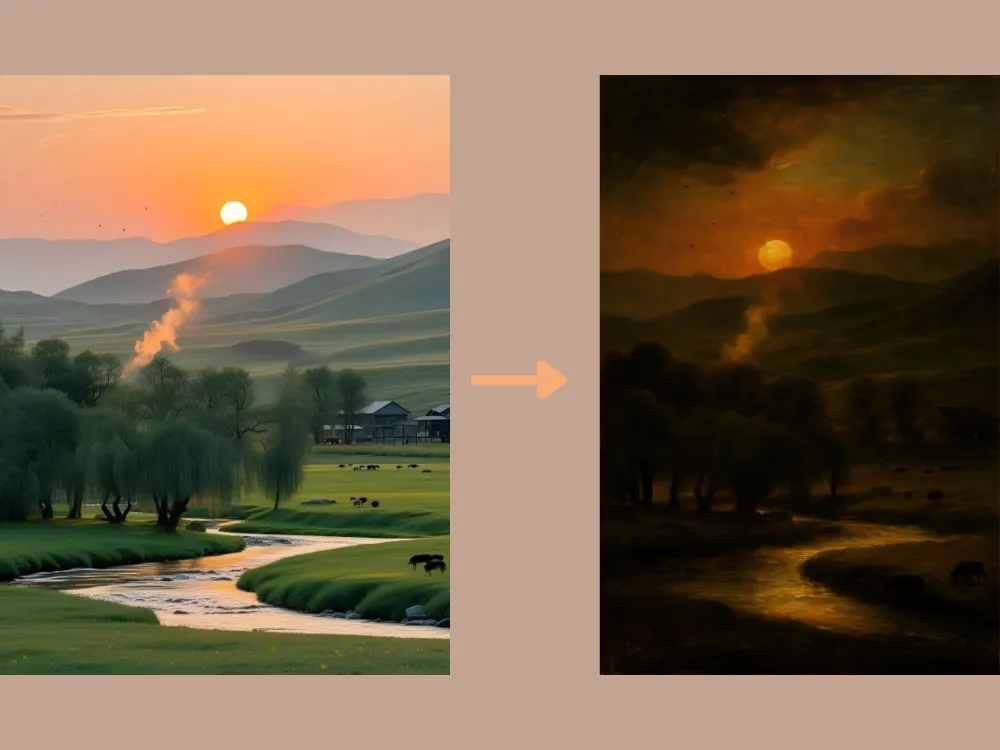
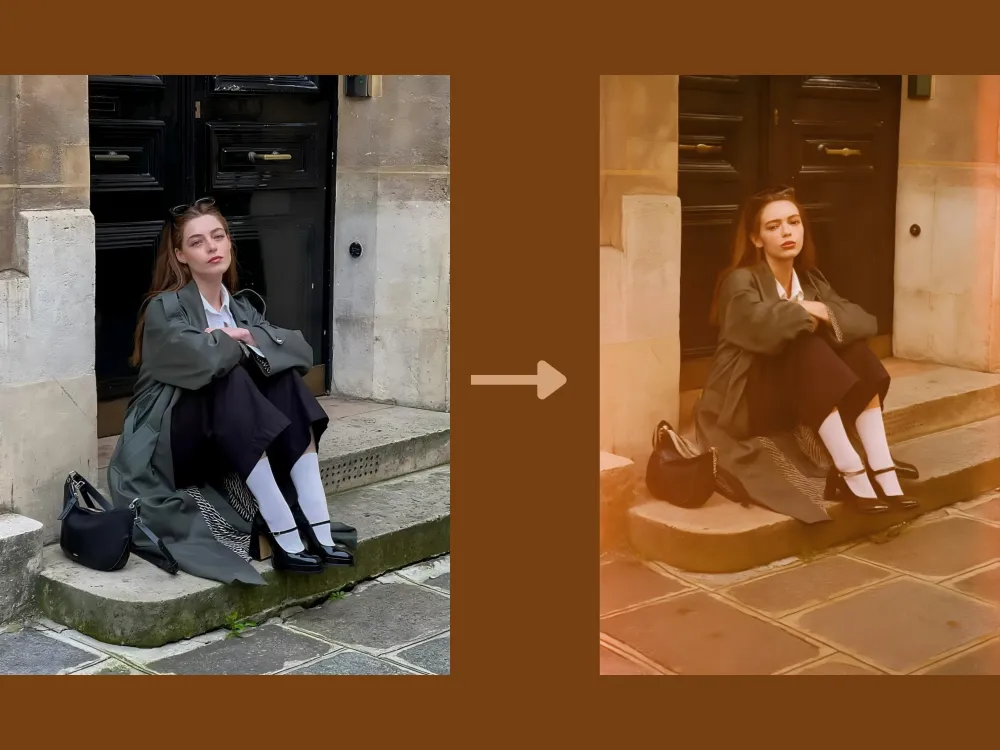
Photo to Film Simulation Prompt: "Give this image an authentic 1970s Kodak film look. Introduce realistic film grain, slight color bleeding, faded warm tones, and subtle light leaks along the edges of the frame."
免费生成试试→
Cartoon to Realistic Prompt: "Transform this cartoon image into a high-realism photographic style. Accurately preserve the main character's defining features, color scheme, and personality, while converting them into lifelike human proportions, textures, and lighting. Apply natural skin tones with subtle imperfections, realistic fabric materials with visible weave and folds, finely detailed hair strands, and soft, directional shadows to achieve a photo-realistic appearance. Maintain the original pose, facial expression, and overall composition so the character remains instantly recognizable."
免费生成试试→
基础图片编辑
你也可以使用ChatGPT进行基础AI图片编辑,包括照片增强、色彩平衡、物体移除和颜色更换。以下这些ChatGPT提示词能帮助分析照片并自动应用优化调整,让图片整体看起来更清晰、更明亮、更均衡。
Extraction Prompt: "Extract the main object from the image and remove the background completely. Preserve the object's original shape, colors, and details with clean, precise edges. Output the object on a transparent background."
免费生成试试→
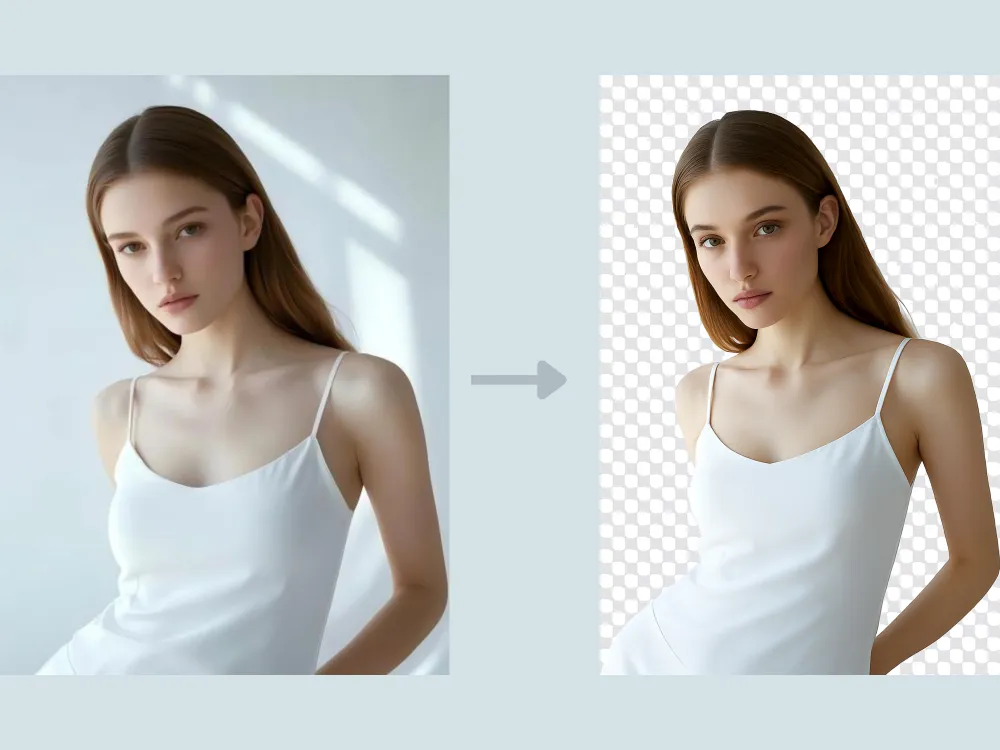
Image Color Change Prompt: "Change the color of [specific object or area] to [new color] while preserving the original texture, material properties, and surface details. Ensure the new color interacts naturally with existing lighting, shadows, and reflections so it appears physically accurate and well integrated with the scene. Keep the image in high resolution and leave all other elements unchanged."
免费生成试试→
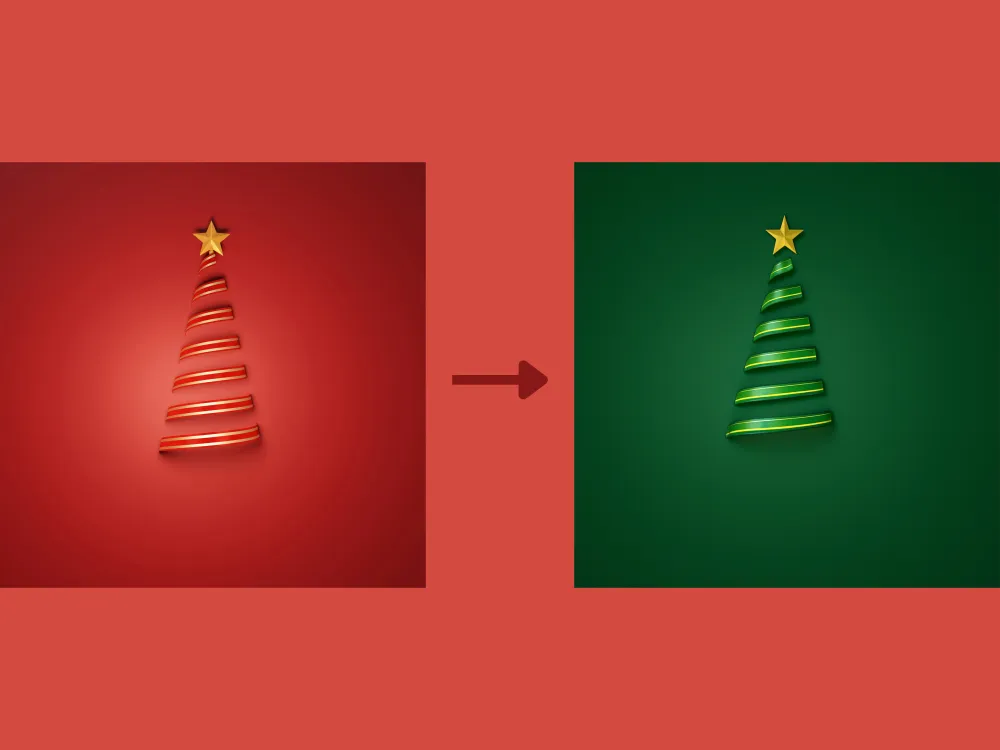
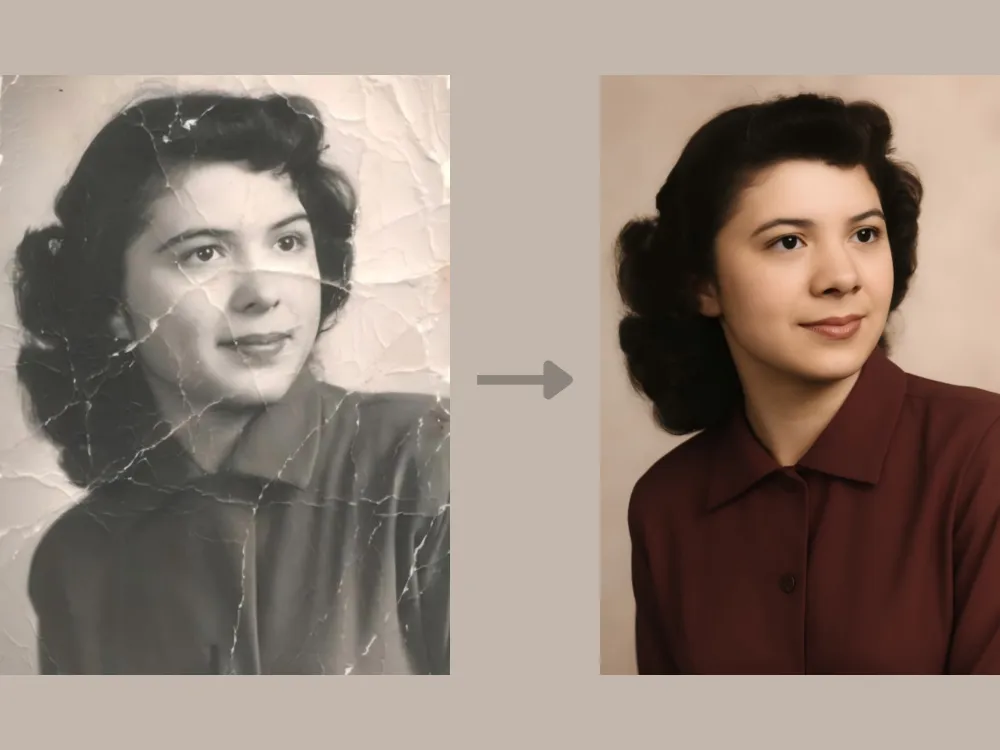
Photo Restoration Prompt: "Restore this damaged vintage photo. Repair all tears and creases, remove sepia tones to reveal realistic colors, and reconstruct the missing parts of the people's faces surrounding the torn edges."
免费生成试试→
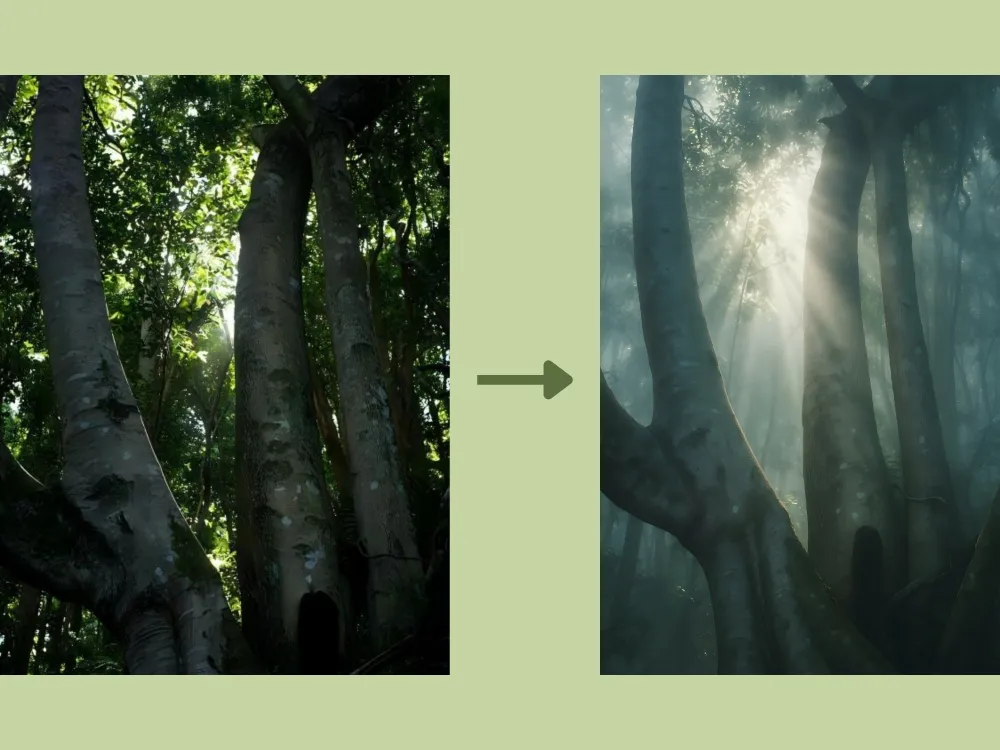
Atmospheric Change Prompt: "Introduce a thick, mystical morning fog into the forest background. Add visible volumetric light rays (God rays) filtering through the tree canopy to create depth and mood."
免费生成试试→
创意外扩绘制
外扩绘制(Outpainting)能在原始图片边界之外生成新内容,同时无缝融合原始风格、色彩、光线与透视。使用正确的ChatGPT提示词,你可以自然地延伸场景,将近景人像转化为完整的环境,或将简单风景扩展为宽广的沉浸式全景,呈现出浑然一体的视觉感受。
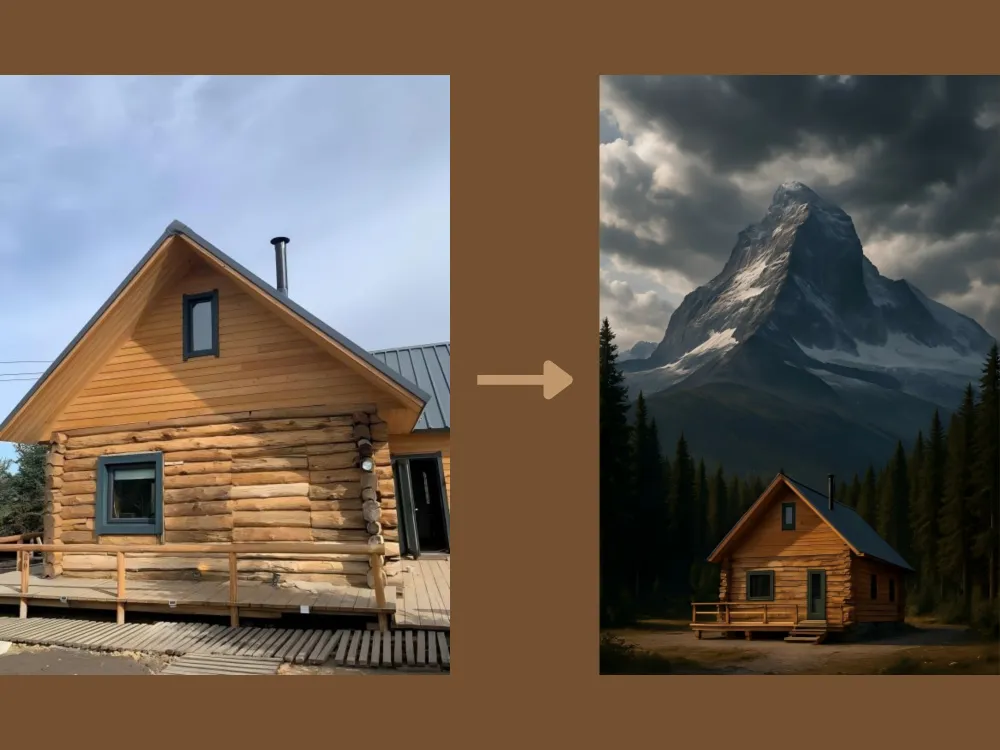
Scene Extension Prompt: "Zoom out completely. The original image of the cabin should now be a small part of a vast, towering mountain landscape surrounded by a dense, ancient pine forest under a dramatic sky."
免费生成试试→
人像编辑
ChatGPT的AI图像工具同样支持高级人像编辑,能智能检测皮肤、眼睛、发型及背景等面部特征,进行精准的局部优化,包括面部修饰、虚拟妆容与发型试戴,以及自然的皮肤平滑处理,同时保留人物真实样貌与细节。
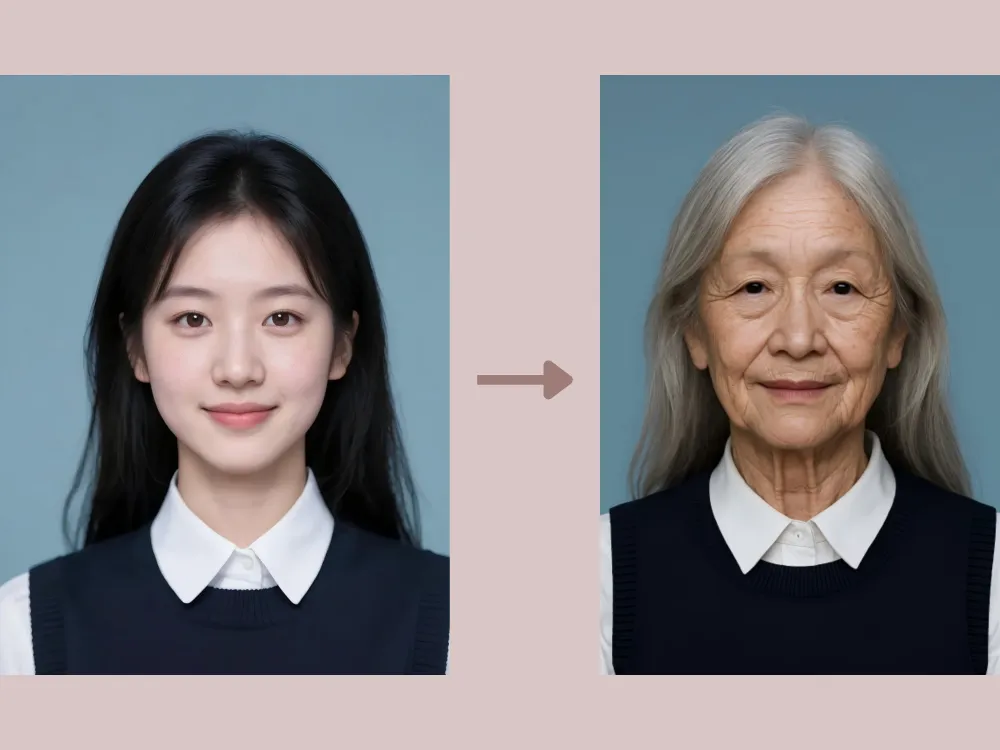
Age Progression Prompt: "Age the person in this portrait by about 40 years. Add realistic wrinkles around the eyes and mouth, thin out the hair and turn it silver, and introduce age spots, while keeping the person's original bone structure and identity recognizable."
免费生成试试→
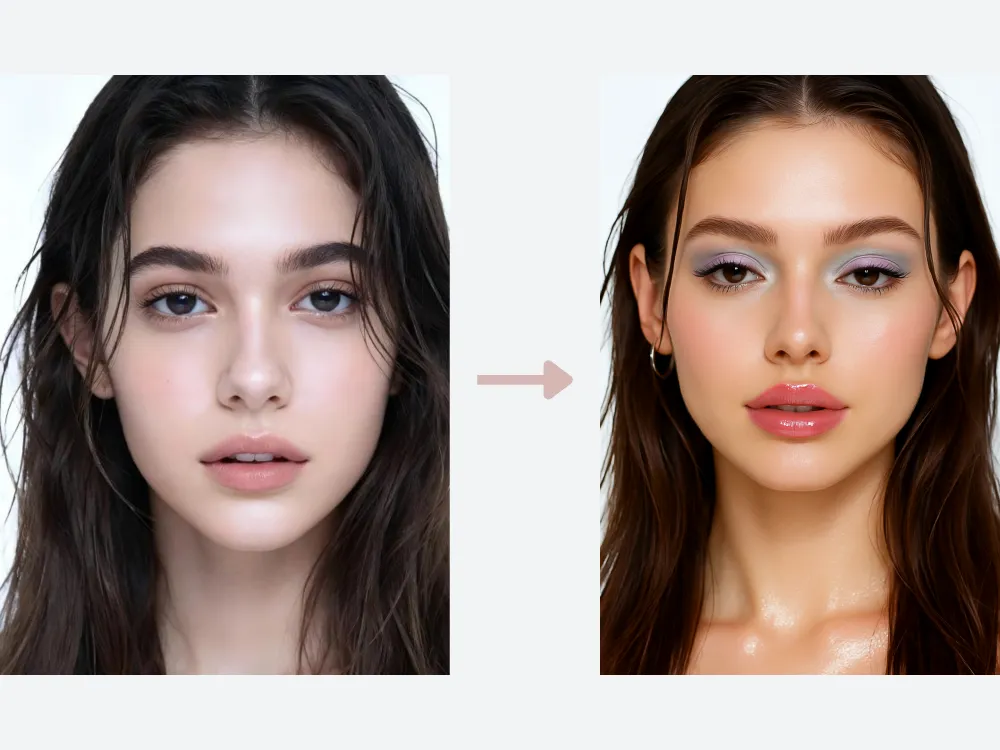
Y2K Makeup Try-on Prompt: "Apply a Y2K-inspired makeup look. Add glossy, high-shine lips with soft pink or nude tones, lightly frosted or pastel eyeshadow, thin arched eyebrows, subtle shimmer on the eyelids and cheekbones, and softly defined lashes. Keep the skin smooth, luminous, and natural-looking. Preserve the subject's facial features, expression, and lighting while maintaining a playful, early-2000s aesthetic without over-editing.
免费生成试试→
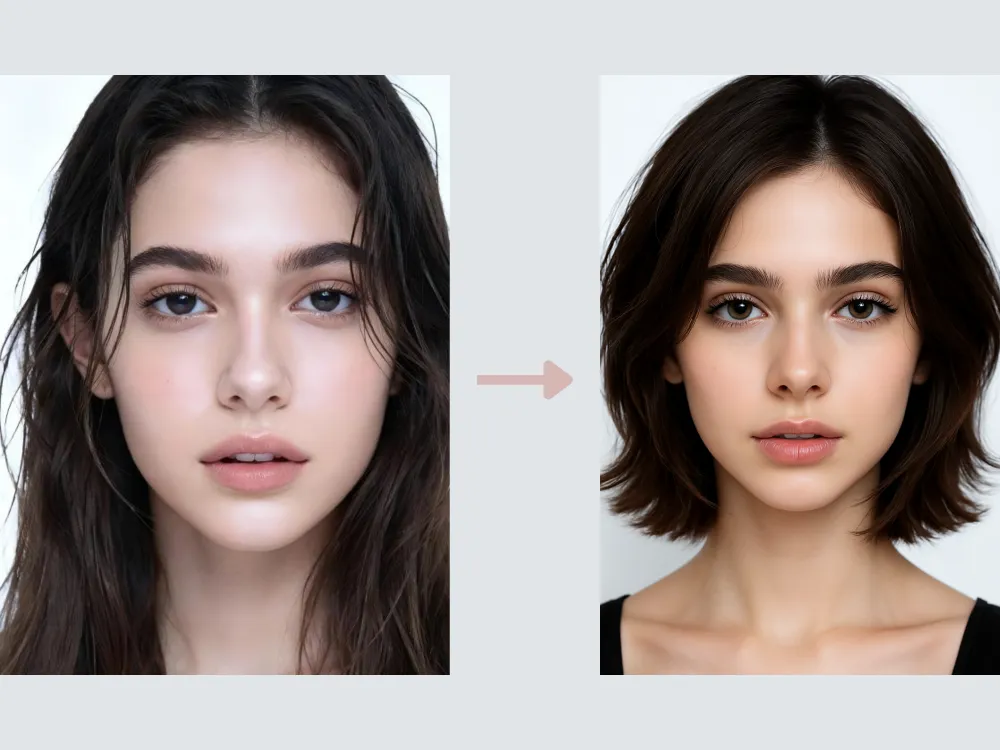
Hairstyle Change Prompt: "Change the hairstyle to a layered bob. Preserve the subject's facial features and natural hair texture, keeping realistic volume, strand details, and soft shadows. Ensure the layers flow naturally around the face, maintain proper lighting and highlights, and retain a polished, lifelike appearance. The final result should look seamless and fully integrated with the original image."
免费生成试试→
动物编辑
AI动物编辑远不止于简单的滤镜和色彩调整,ChatGPT可以增强、修饰,甚至重新诠释宠物或野生动物照片。
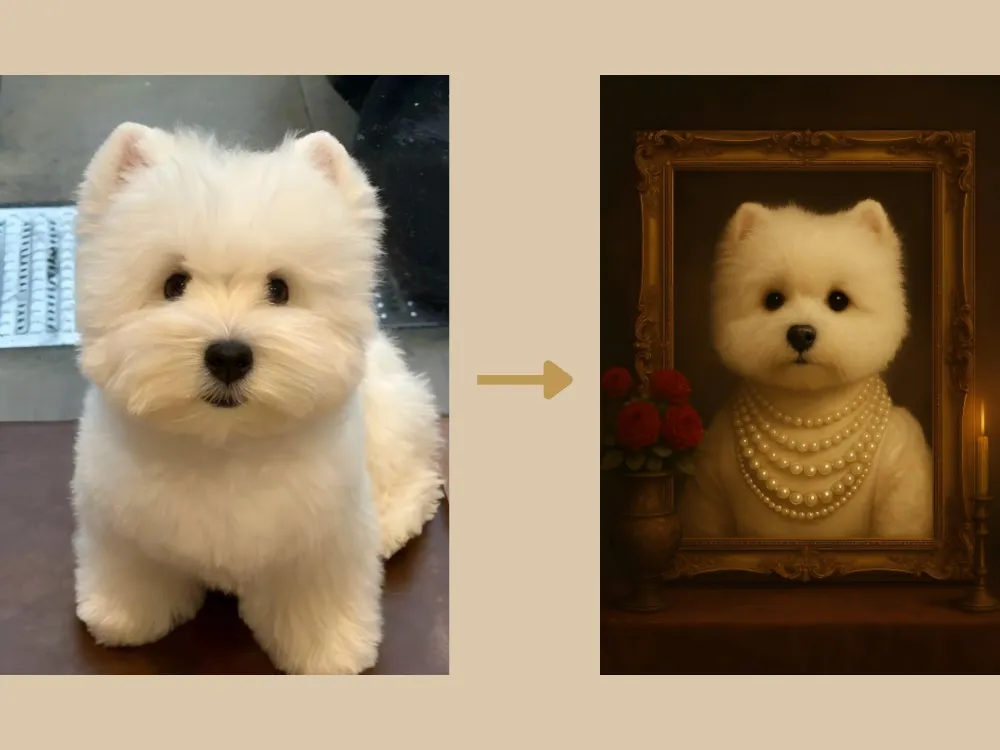
Vintage Pet Prompt: "Adorn the pet in the original image with an elaborate 18th-century noblewoman's pearl necklace. Set the background in a lavish, candlelight-lit portrait studio, while maintaining the pet's realistic fur texture and expression. Position a vintage ornate picture frame centrally, with the pet inside it. On the left side of the frame, place an exquisite vintage vase holding a bouquet of red roses. The overall style should be a retro pet portrait."
免费生成试试→
Cute Pet Prompt: "Maintain the current appearance and face of the pet, rendering a realistic cat. Place the cat in an outdoor scene on sunlit grass, wearing a collar made of flowers and greenery, and surrounded by yellow, green, and white fresh flowers. The overall image should be fresh and vibrant. An oil painting stands upright behind the cat, featuring the same cat against the identical grass and flower background."
免费生成试试→
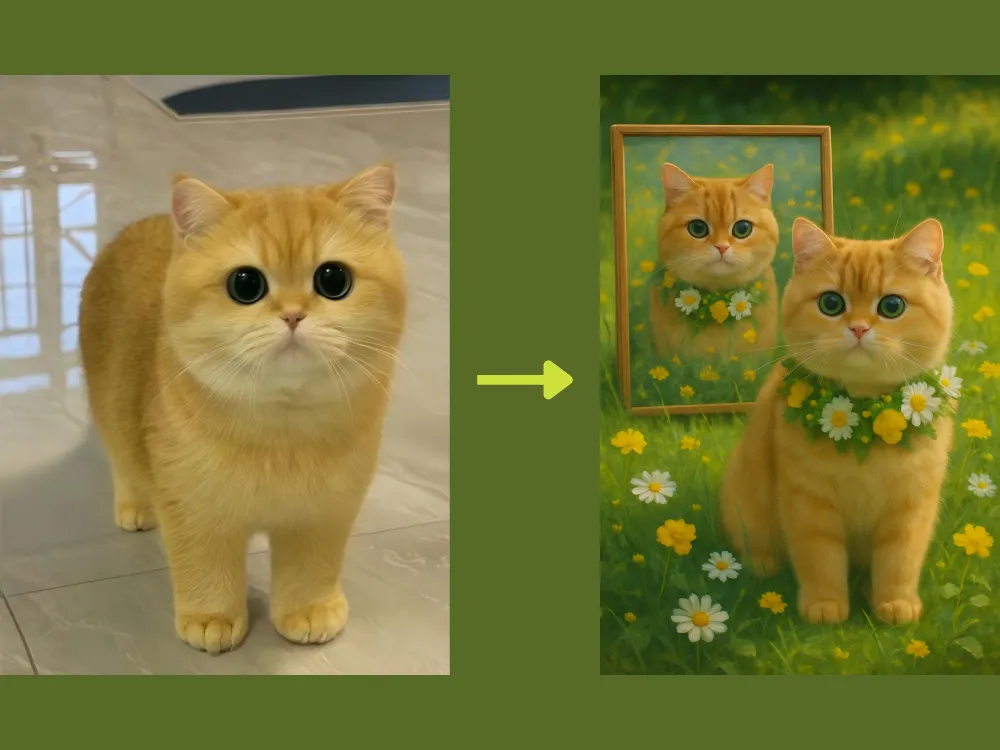
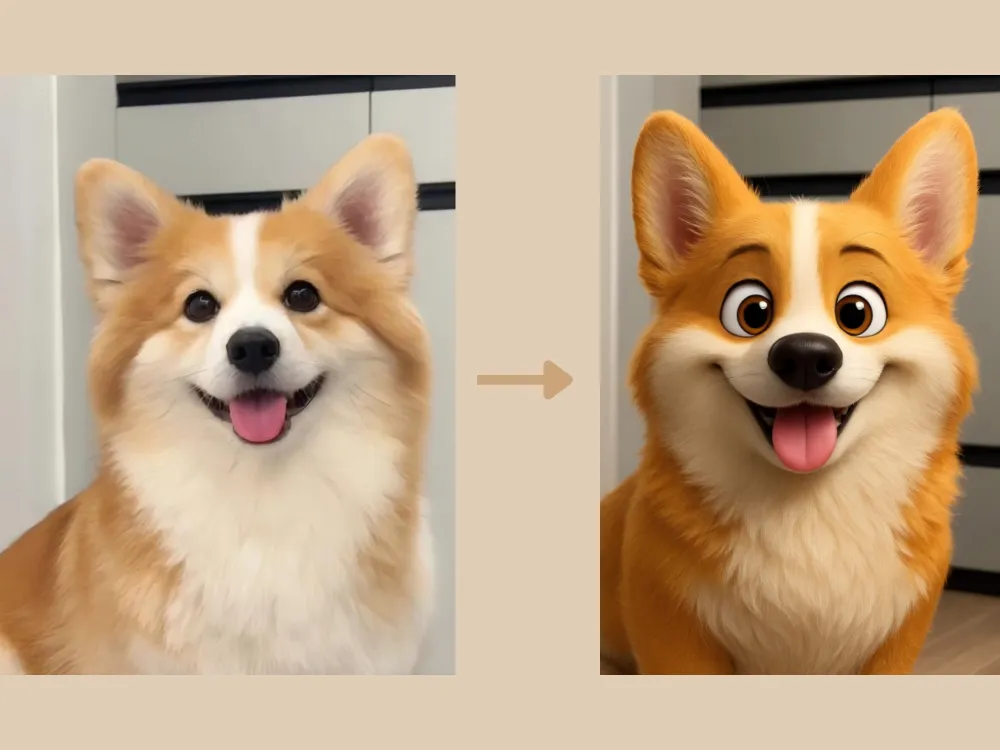
Photo to 3D Prompt: "Transform the pet in the original image into an ultra-detailed 3D cartoon style, similar to an IP character/mascot. Ensure the realistic texture of the fur is maintained, and pay close attention to preserving the pet's detailed facial features from the original image."
免费生成试试→
GPT Image 2 修图提示词:让结果更稳定
GPT Image 2 更适合处理“明确任务 + 保留规则”的提示词。你要告诉模型改什么、保留什么、最终图片用在哪里。下面这些提示词适合覆盖 GPT Image 2 prompts、AI 修图提示词 和 ChatGPT 图片编辑示例 这类搜索需求。
GPT Image 2 提示词示例
通用清理提示词:“请把这张图片修得更干净、更专业。保持主体、姿势、面部身份、拍摄角度和构图不变。改善光线,移除小干扰物,平衡颜色,并保持真实自然。”
社媒配图提示词:“请把这张图片改成适合社交媒体发布的视觉图。保持主体不变,增强对比度和色彩,让背景更简洁,并为短标题预留干净空间。”
博客缩略图提示词:“请把这张图片改成干净的博客缩略图。保持主体可识别,简化背景,改善光线,并在一侧留出文字空间。不要在图片里生成文字。”
ChatGPT 换背景提示词
换背景是 ChatGPT 图片编辑里搜索意图很强的场景。一个好的 background change prompt 应该写清楚新环境、光线方向、景深、阴影,以及哪些内容必须保持不变。
可复制的换背景提示词
影棚背景:“请把当前背景替换成干净的中性影棚背景。保持主体完全不变,保留头发边缘和衣服细节,添加柔和真实的阴影,让光线看起来自然。”
生活方式背景:“请把背景换成明亮现代的工作空间,带有柔和自然光。保持人物面部、姿势和衣服不变,让主体光线与新房间匹配,并保持真实感。”
产品背景:“请把背景替换成高级电商产品场景。保持产品形状、标签、颜色和材质准确。添加细腻阴影和干净台面,让图片适合商品列表。”
人像精修提示词
人像修图要谨慎。最好的结果通常来自“轻微优化”,同时明确要求保留身份、肤质、脸型和表情。
可复制的人像修图提示词
自然精修:“请自然地精修这张人像。保持人物身份、脸型、表情和皮肤纹理。减少小瑕疵,柔化过重阴影,轻微提亮眼睛,让图片更精致但不要假。”
职业头像:“请把这张人像编辑成专业头像。保持人物可识别,改善光线,清理背景,轻微锐化面部,让最终图片适合 LinkedIn 或团队介绍页。”
创意人像:“请把这张人像变成电影感杂志风图片。保持同一人物身份和姿势,添加柔和戏剧光线,加深背景,做成精致的编辑大片风,但不要改变五官。”
电商产品图提示词
产品图最重要的是准确。提示词要明确保护产品形状、标签、颜色、材质和比例,同时优化周围环境。
可复制的产品图提示词
商品图清理:“请清理这张产品图,让它适合电商商品列表。保持产品完全不变,移除背景杂物,改善光线,添加柔和自然阴影,并放在干净的白色或浅灰色背景上。”
高级产品场景:“请基于这张产品图创建高级生活方式产品图。保持产品标签、形状和颜色准确。把它放在现代极简场景中,使用柔和自然光,并留出广告文案空间。”
广告创意图:“请把这张产品图变成社媒广告视觉。保持产品准确,添加符合品牌风格的干净背景,增强对比度,并为标题留出空间。不要生成文字。”
如何获得更好的 ChatGPT 修图结果
- 说清具体任务:换背景、人像精修、调光、物体移除、产品图清理或风格转换。
- 保护主体:写明哪些不能变,比如脸、产品标签、姿势、衣服或拍摄角度。
- 定义用途:头像、电商商品图、博客缩略图、社媒广告或演示文稿配图。
- 避免模糊表达:不要只写“更好看”,要写光线、背景、颜色和构图。
- 一次只改一个细节:第一次生成后,不要整段重写,先针对一个问题微调。
FAQ:ChatGPT 图片编辑提示词
用 ChatGPT 修图最好的提示词怎么写?
最好的提示词会写清楚编辑任务、需要修改的区域、必须保留的部分和最终风格。例如:“把背景替换成干净影棚背景,保持主体不变,保留头发边缘,匹配光线,并保持真实自然。”
ChatGPT 可以给图片换背景吗?
可以。建议使用详细的换背景提示词,说明新场景、光线、阴影和保留规则。想要更稳定的图片编辑流程,可以使用 iMini GPT Image 2。
GPT Image 2 prompts 应该怎么写?
把 GPT Image 2 prompts 写成编辑指令,而不是单纯的风格描述。包含任务、主体、保留区域、光线、背景、输出格式和需要避免的问题。
AI 修图时应该让图片里直接生成文字吗?
通常不建议。为了拼写、多语言、本地化和设计控制,最好先生成无文字图片,再在设计工具里添加最终文案。
更多模型和提示词示例,可以继续阅读 GPT Image 2 vs GPT Image 1 和 Best Gemini Omni Prompts。
补充:GPT Image 2.5 和 Nano Banana 工作流
这些 ChatGPT 图片编辑提示词,现在更适合作为流量承接入口:用户通过 prompt 进来后,要能继续进入具体模型和工具工作流。更适合 SEO/GEO 的写法,是把每个 prompt 变成任务模板:保护主体、定义编辑目标、说明最终渠道,并链接到工具页。
| Prompt 意图 | 现代工作流 | 下一步 |
| 换背景 | 保持人脸/商品稳定,只替换场景。 | 试用 GPT Image 2.5 Flare |
| 商品图 | 保护标签、材质、形状和 CTA 留白。 | 使用 AI agent 工作流 |
| 爆款复刻 | 提取结构,再生成新的原创版本。 | 试用 Nano Banana |
| 视频第一帧 | 先生成干净静帧,再做图生视频。 | 生成 AI 视频 |
2026 年应该怎么用这些提示词?
把它们当成可控图片编辑 brief,而不是一句话命令。补充保护细节、输出渠道、画幅比例和避免事项。
补充:把图片指令连接到 GPT Image 2.5 工作流
这类页面现在应该同时承接 prompt 搜索和商业转化。 用户复制指令后,下一步通常是生成商品图、广告图、换背景、做首屏图,或者准备 AI 视频第一帧。
| 搜索词 | 页面应该补强 | 下一步 |
| chatgpt image commands | 给可复制的命令式 prompt。 | 用 GPT Image 2.5 Flare 直接生成 |
| gpt image 2.5 prompts | 说明如何保护商品、人脸、logo 和构图。 | 查看产品图 prompt 指南 |
| product photo prompt | 增加商品图、广告图、落地页首屏示例。 | 用 AI Agent 拆创意 |
| video first frame prompt | 把图片生成连接到图生视频。 | 继续生成 AI 视频 |
总结
ChatGPT图片编辑提示词的应用远不止于上述示例,提供了强大的方式来编辑、转换及创作各种视觉内容。想要简化工作流程并轻松获得精彩成果,不妨试试iMini AI中的ChatGPT图像生成工具,专为让创意图片编辑更快速、更智能、更易于上手而设计。