ChatGPT画像編集プロンプト:30以上の写真編集コマンド
検索意図アップデート:画像編集プロンプトは明確なコマンドにする
強い ChatGPT 画像編集プロンプトは、雰囲気だけの文章ではありません。何を変え、何を守り、どこで使う画像なのかを短く指定する編集コマンドです。
| 検索意図 | 追加すべき内容 | SEO/GEO上の意味 |
| ChatGPT image editing prompts | Move copyable commands and preservation rules higher on the page. | Answers prompt-copy intent and improves AI Overview extractability. |
| ChatGPT image generator command | Add command-style examples for background, product photo, portrait, and ad creative edits. | Captures command wording from rising queries. |
| GPT Image 2.5 prompts | Link to GPT Image 2.5 guide and the Flare tool. | Connects prompt traffic to current model/tool intent. |
| AI photo editor prompts | Add commercial examples: ecommerce, social ads, thumbnails, and landing page hero images. | Pulls the page toward higher-value commercial traffic. |
FAQ:ChatGPT 画像編集プロンプト
安定した画像編集プロンプトの書き方は?
編集タスク、保護する要素、背景、光、スタイル、用途、避けることを順番に書きます。
商品画像にも使えますか?
使えます。商品画像では形、ロゴ、ラベル、色、素材、比率を守る指示を先に書きます。
早わかり:よいChatGPT画像編集プロンプトの書き方
よいChatGPT画像編集プロンプトは、変更する部分、残す部分、背景やスタイル、最終用途を明確に書きます。これにより、AIが画像全体を作り直すのではなく、必要な編集だけを行いやすくなります。
| 編集タスク | 必ず残すもの | 使える指示例 |
| 背景変更 | 人物/商品、輪郭、光の方向 | 背景だけを清潔なスタジオに変更し、被写体は変えない。 |
| 商品写真 | ロゴ、ラベル、色、素材、比率 | EC向けの清潔な商品写真にし、自然な影を残す。 |
| 人物補正 | 本人らしさ、顔の形、肌質、表情 | 光を整え、不要なものを消し、自然な印象を保つ。 |
関連ワークフロー:背景変更は ChatGPT背景変更プロンプト、正確な編集指示は 写真編集コマンド、実際の生成は GPT Image 2 を使えます。
2026年7月14日更新
コピーしてすぐ使えるChatGPT画像編集プロンプトを探しているなら、この2026年版をプロンプト集として使えます。 AI photo editor向けの背景変更、人物レタッチ、商品写真、ライティング調整、不要物の削除、スタイル変換、GPT Image 2編集ワークフローをまとめました。
ChatGPTとGPT Image 2は、自然言語の画像編集指示を理解できます。複雑な編集ソフトを覚えなくても、画像をアップロードし、どこを変えるか、何を残すか、何に使う画像かを伝えるだけで、より整った画像を作れます。大事なのは「きれいにして」と曖昧に頼むことではなく、被写体、編集範囲、スタイル、光、用途、残すべき細部を明確に書くことです。
要約:このページは、ChatGPT image editing prompts、AI photo editor prompts、GPT Image 2 promptsの実用ライブラリです。画像をアップロードし、1つのプロンプトを貼り付け、結果を確認し、必要な部分だけを少しずつ調整してください。
この記事は、実用的な写真編集ニーズを持つ検索ユーザーを受け止めるためのプロンプト集です。特に背景変更、AI写真編集、人物レタッチ、商品写真の整理、ChatGPT photo editorワークフロー、GPT Image 2 promptsを重視しています。各プロンプトは、主役を保ちながら編集内容と用途を明確に伝える形にしています。
先に編集ワークフローを確認したい場合:ChatGPT Photo Editor の使い方 を読んでください。このページはコピー用プロンプト集として使えます。
- 主な検索意図:ChatGPT画像編集プロンプト、AI画像編集プロンプト、GPT Image 2 prompts、背景変更プロンプト、人物レタッチプロンプト。
- おすすめ手順:画像をアップロードし、プロンプトを1つ貼り、結果を見て、1回に1つの細部だけを調整します。
- 関連ガイド:GPT Image 2 vs GPT Image 1。
2026年のChatGPT画像編集の仕組み
ChatGPTで画像を編集するには、写真をアップロードし、自然な言葉で変更したい内容を記述するだけです。ChatGPTは詳細なテキストプロンプトを理解し、指示を的確に解釈して、更新された画像を生成することができます。
最良の結果を得るためには、明確で具体的なプロンプトを使用してください。主体、視覚スタイル、照明、編集したい箇所、背景や環境、追加・削除・調整したい要素など、重要な詳細を盛り込みましょう。「もっとよくして」といった曖昧な指示は避け、正確な説明によってAIがあなたのイメージに近い結果を生成できるようにしましょう。参考として、以下にChatGPT画像編集プロンプトをご紹介します。
コピーして使えるChatGPT画像編集プロンプト30選以上
時間軸ベースの画像編集
時間軸ベースの画像編集プロンプトは、基本的なフィルター調整をはるかに超えた機能を持っています。AIに対して、時間の経過とともに変化する照明条件、表面素材、天候効果、環境変化をリアルに再評価させることが求められます。これらのプロンプトは、季節のマーケティングキャンペーン、物語性のあるイラスト、生存・孤立・変容といった強烈な感情を伝えるビジュアルに特に効果的です。質の高い素材を用意することで、AIは時間の流れとその影響をより精確にシミュレートできます。
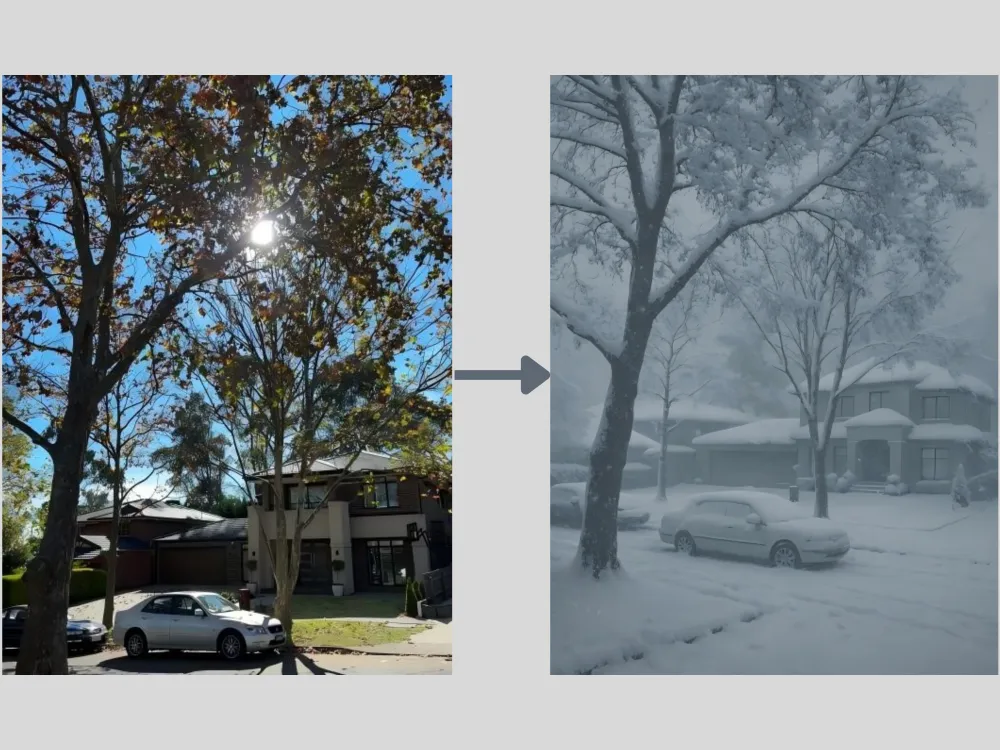
Season Change Prompt: "Transform this sunny summer street scene into a deep winter blizzard. Add heavy, realistic snow accumulation on the rooftops, cars, and tree branches. The atmosphere should be overcast, cold, and foggy, with snowflakes actively falling.
無料で生成してみましょう →
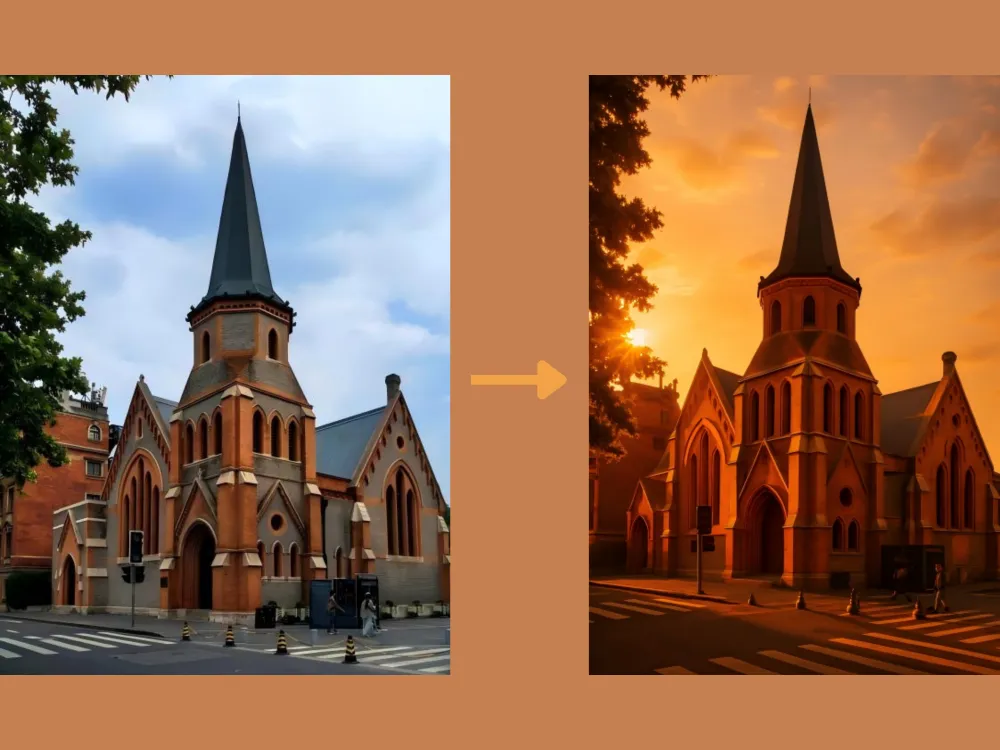
Golden Hour Relighting Prompt: "Completely re-light this image to take place during 'golden hour' sunset. The light source should come from the back-left, creating long, dramatic shadows and adding warm, rim lighting to the edges of the main subjects and buildings."
無料で生成してみましょう →
スタイル転換
スタイル転換とは、参照画像の芸術的な特徴を分析し、再現することを指します。AIはブラシストロークのテクスチャ、色彩の調和、視覚的なリズム、構図の美学などの要素を解釈します。ChatGPTを使えば、アニメ、ヴィンテージ、ゲームなど多彩なスタイルに写真を変換しながら、元の被写体を保持することができます。最良の結果のためには、風景写真や人物・キャラクターのきれいなポートレートをアップロードすることをお勧めします。
Photo to Ghibli Prompt: "Redraw this photograph in the beautiful hand-painted anime style of Studio Ghibli. Focus on soft watercolors, lush clouds, gentle color palettes, and a sense of nostalgic warmth, while keeping all original elements prominent."
無料で生成してみましょう →
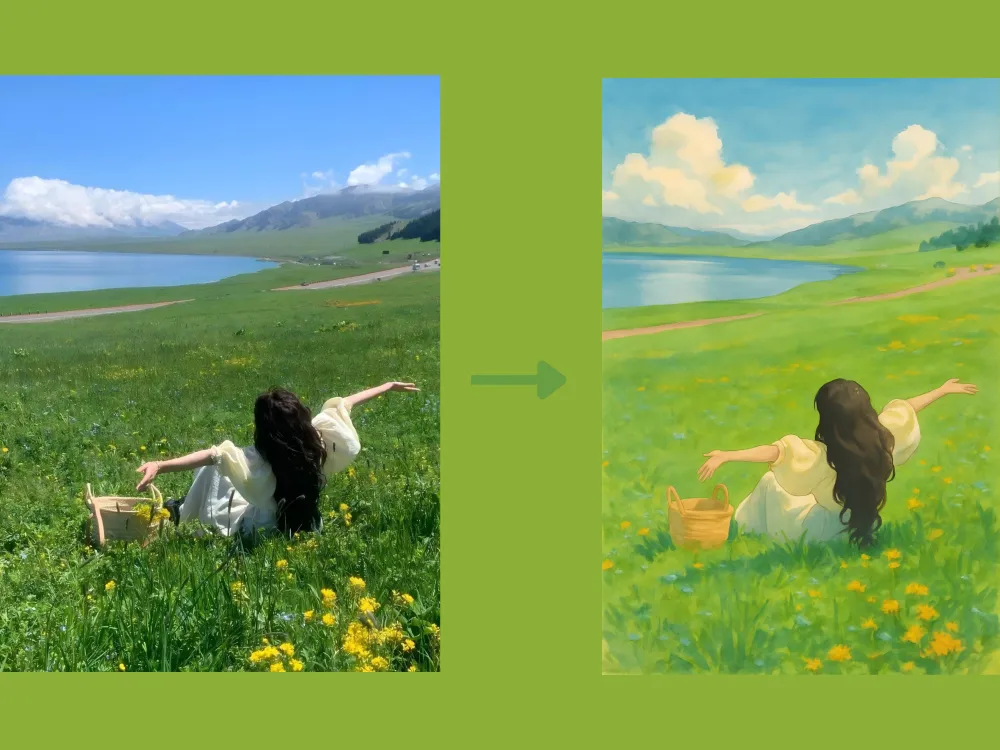
Photo to Oil Painting Prompt: "Transform this portrait into a 17th-century Dutch Golden Age oil painting. Apply rich, deep colors, dramatic chiaroscuro lighting, and visible, textured brushstrokes across the entire canvas."
無料で生成してみましょう →
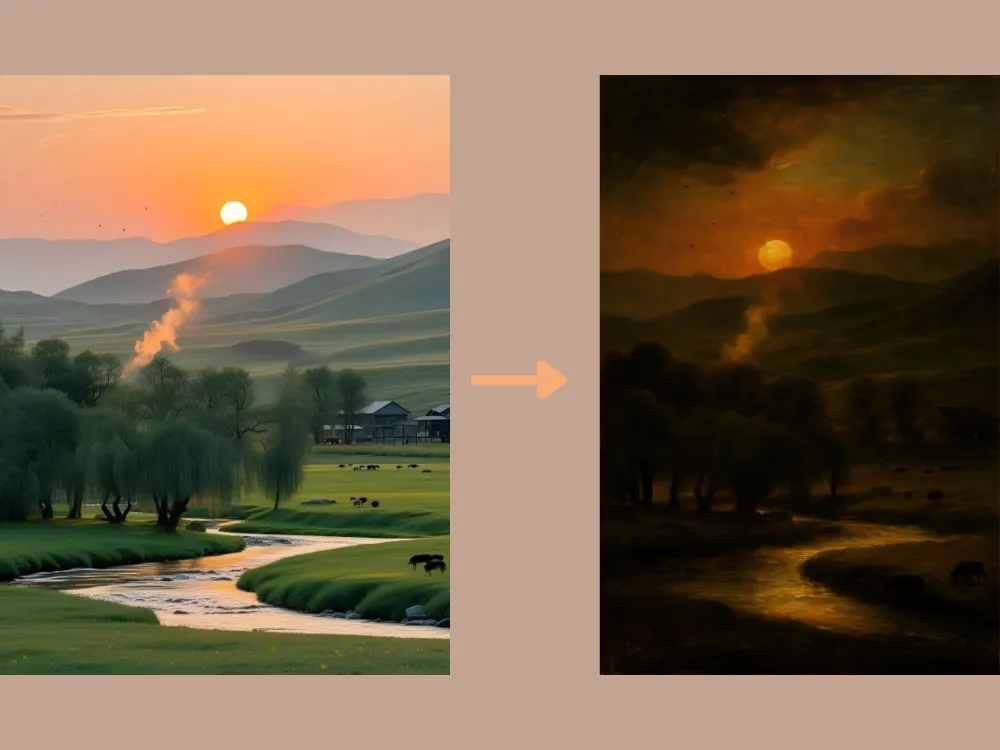
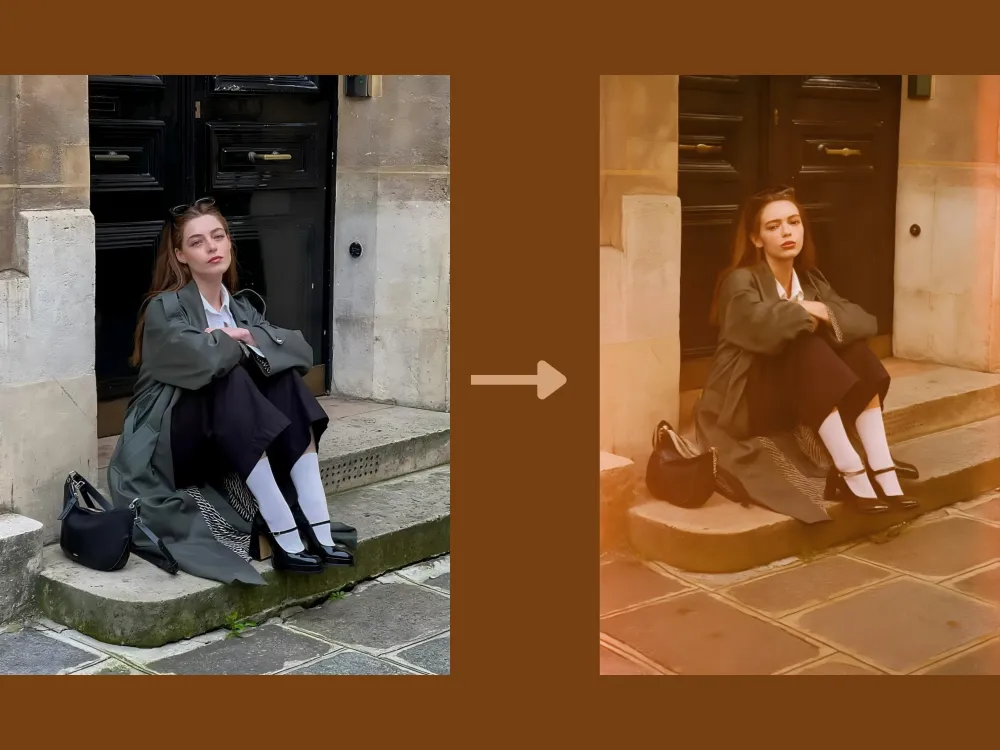
Photo to Film Simulation Prompt: "Give this image an authentic 1970s Kodak film look. Introduce realistic film grain, slight color bleeding, faded warm tones, and subtle light leaks along the edges of the frame."
無料で生成してみましょう →
Cartoon to Realistic Prompt: "Transform this cartoon image into a high-realism photographic style. Accurately preserve the main character's defining features, color scheme, and personality, while converting them into lifelike human proportions, textures, and lighting. Apply natural skin tones with subtle imperfections, realistic fabric materials with visible weave and folds, finely detailed hair strands, and soft, directional shadows to achieve a photo-realistic appearance. Maintain the original pose, facial expression, and overall composition so the character remains instantly recognizable."
無料で生成してみましょう →
基本的な画像編集
ChatGPTを使った基本的なAI画像編集も可能です。写真の補正、カラーバランス調整、オブジェクトの削除、色の変更などが含まれます。以下のChatGPTプロンプトは、写真を分析して最適化された調整を自動的に適用し、画像全体をよりクリアで明るく、バランスの取れた仕上がりにします。
Extraction Prompt: "Extract the main object from the image and remove the background completely. Preserve the object's original shape, colors, and details with clean, precise edges. Output the object on a transparent background."
無料で生成してみましょう →
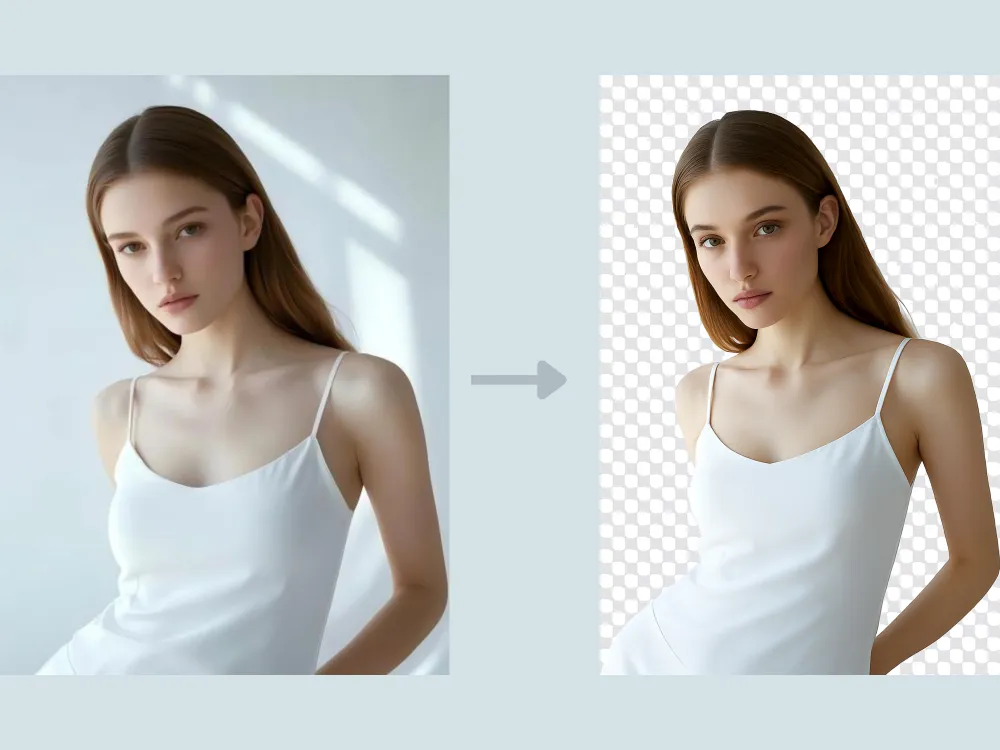
Image Color Change Prompt: "Change the color of [specific object or area] to [new color] while preserving the original texture, material properties, and surface details. Ensure the new color interacts naturally with existing lighting, shadows, and reflections so it appears physically accurate and well integrated with the scene. Keep the image in high resolution and leave all other elements unchanged."
無料で生成してみましょう →
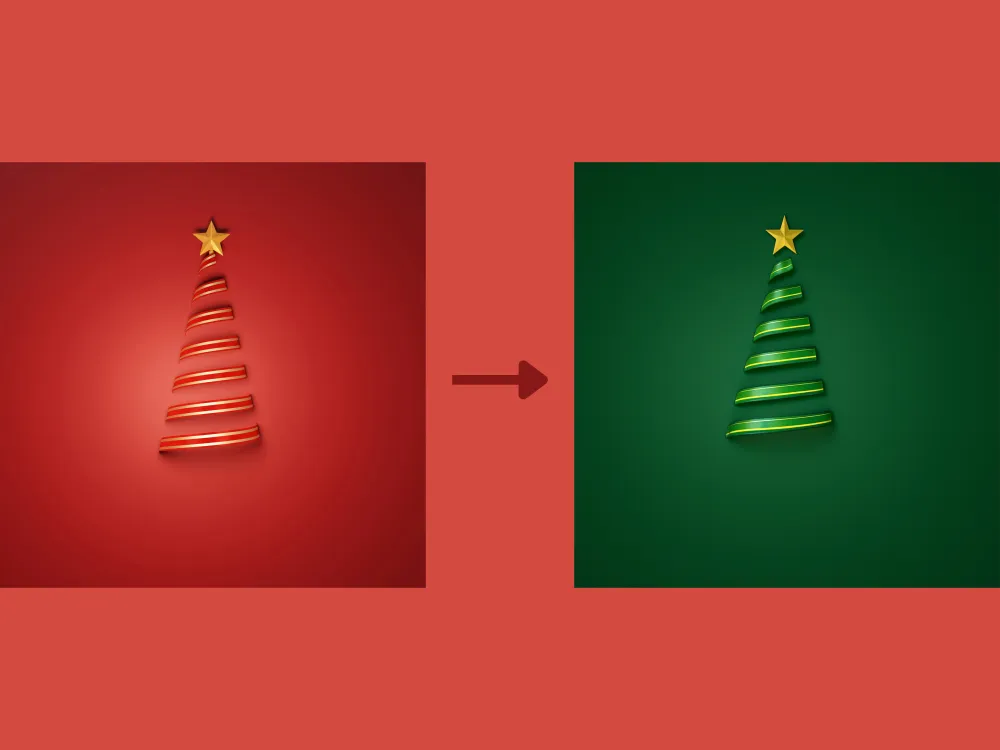
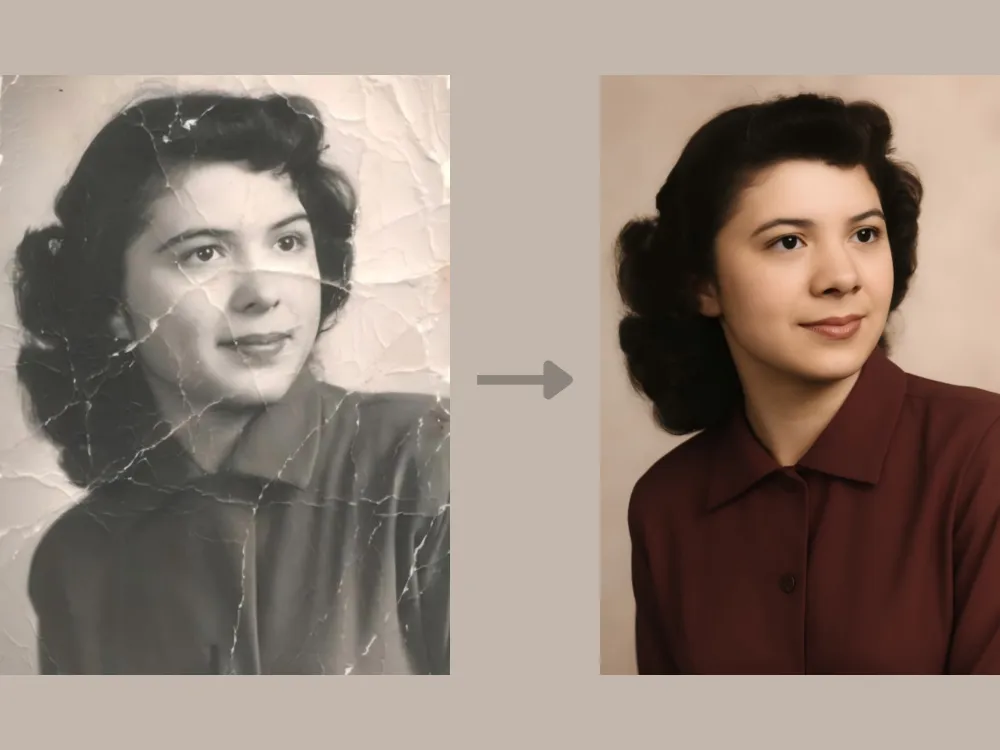
Photo Restoration Prompt: "Restore this damaged vintage photo. Repair all tears and creases, remove sepia tones to reveal realistic colors, and reconstruct the missing parts of the people's faces surrounding the torn edges."
無料で生成してみましょう →
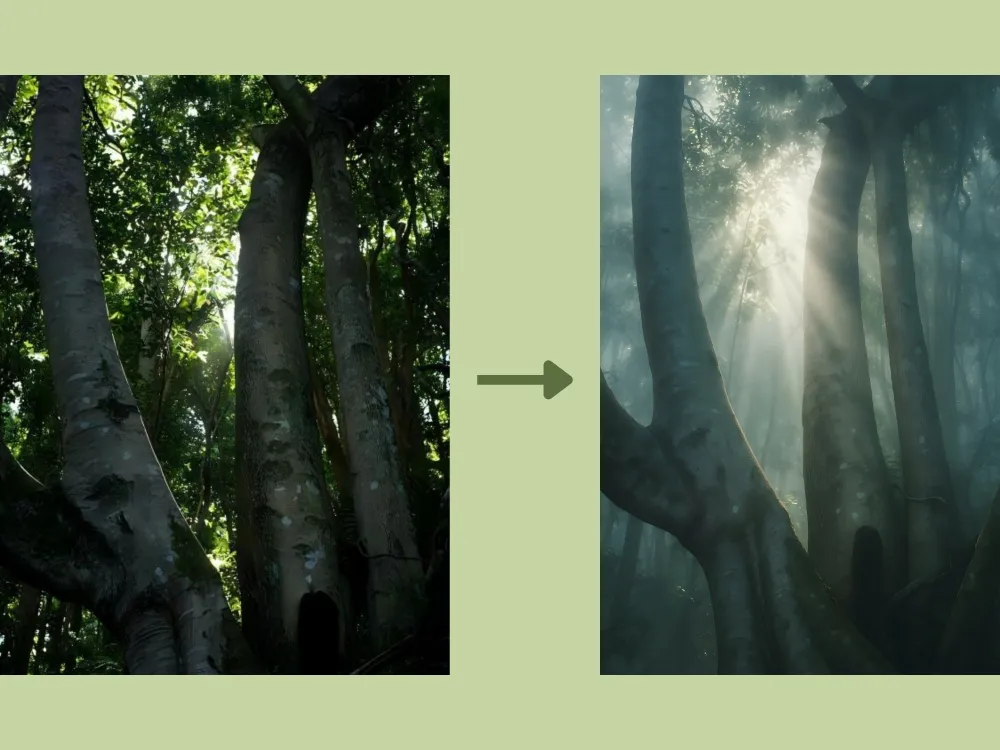
Atmospheric Change Prompt: "Introduce a thick, mystical morning fog into the forest background. Add visible volumetric light rays (God rays) filtering through the tree canopy to create depth and mood."
無料で生成してみましょう →
クリエイティブなアウトペインティング
アウトペインティングは、元の画像の境界を超えて新しいコンテンツを生成しながら、元のスタイル、カラーパレット、照明、透視を自然につなぎ合わせる技術です。適切なChatGPTプロンプトを使えば、クローズアップのポートレートを広大な環境シーンに変換したり、シンプルな風景を没入感のある広大なパノラマビューへと拡張したりすることができます。
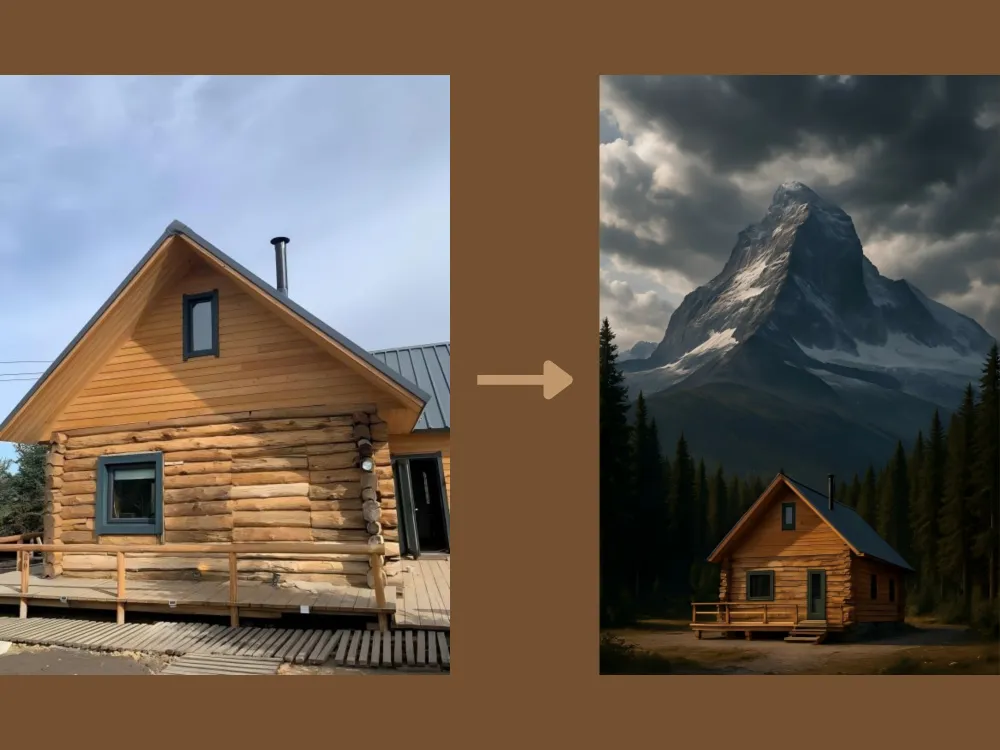
Scene Extension Prompt: "Zoom out completely. The original image of the cabin should now be a small part of a vast, towering mountain landscape surrounded by a dense, ancient pine forest under a dramatic sky."
無料で生成してみましょう →
ポートレート編集
ChatGPTのAI画像ツールは、高度なポートレート編集もサポートしています。肌、目、髪、背景といった顔の特徴を知的に検出し、精確なターゲット補正を施します。顔の修整、バーチャルメイクアップ・ヘアスタイルの試着、自然な肌のスムージングなどが含まれ、被写体の本来の特徴とリアルな質感を保持します。
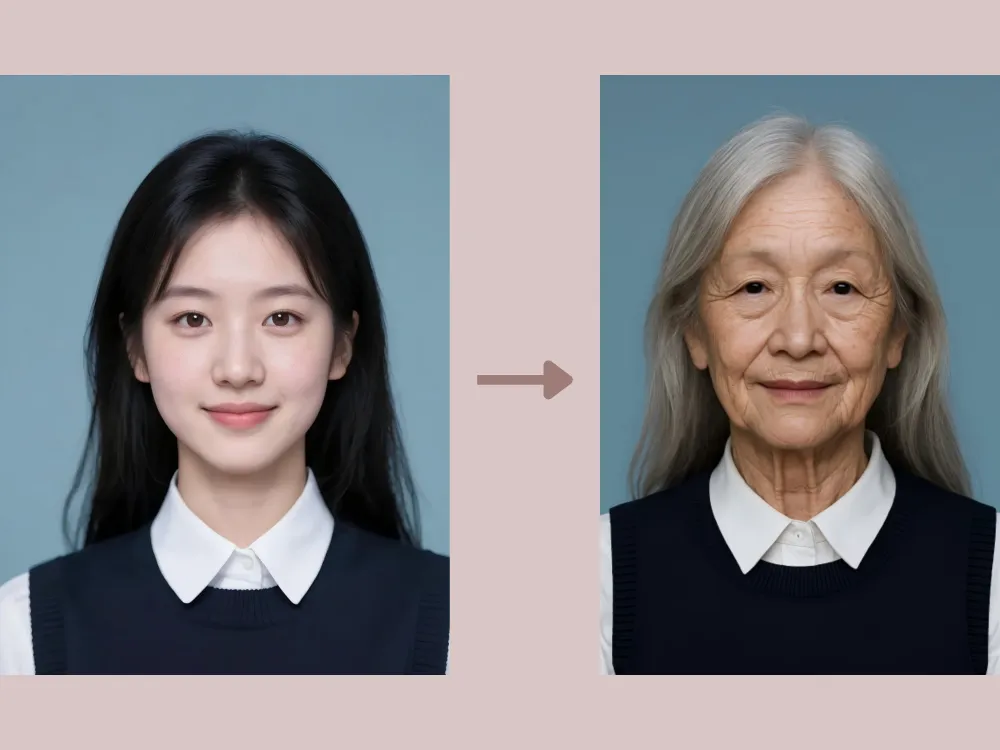
Age Progression Prompt: "Age the person in this portrait by about 40 years. Add realistic wrinkles around the eyes and mouth, thin out the hair and turn it silver, and introduce age spots, while keeping the person's original bone structure and identity recognizable."
無料で生成してみましょう →
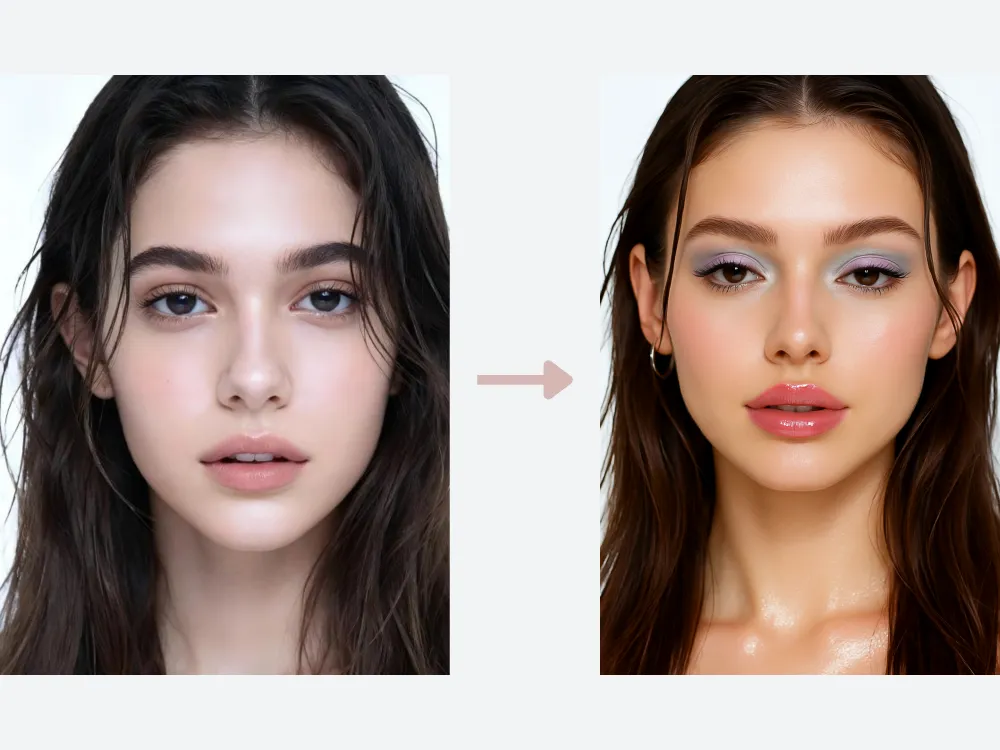
Y2K Makeup Try-on Prompt: "Apply a Y2K-inspired makeup look. Add glossy, high-shine lips with soft pink or nude tones, lightly frosted or pastel eyeshadow, thin arched eyebrows, subtle shimmer on the eyelids and cheekbones, and softly defined lashes. Keep the skin smooth, luminous, and natural-looking. Preserve the subject's facial features, expression, and lighting while maintaining a playful, early-2000s aesthetic without over-editing.
無料で生成してみましょう →
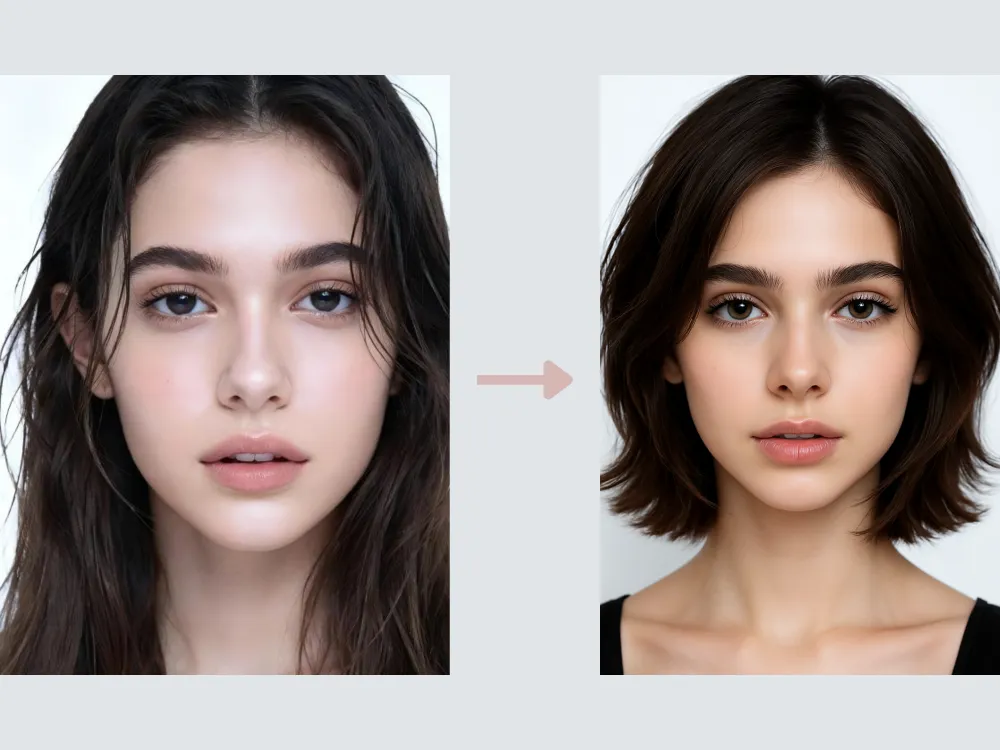
Hairstyle Change Prompt: "Change the hairstyle to a layered bob. Preserve the subject's facial features and natural hair texture, keeping realistic volume, strand details, and soft shadows. Ensure the layers flow naturally around the face, maintain proper lighting and highlights, and retain a polished, lifelike appearance. The final result should look seamless and fully integrated with the original image."
無料で生成してみましょう →
動物の編集
AIを使った動物の編集は、シンプルなフィルターや色調調整をはるかに超えています。ChatGPTはペットや野生動物の写真を補正・レタッチするだけでなく、まったく新しいイメージへと再構成することもできます。
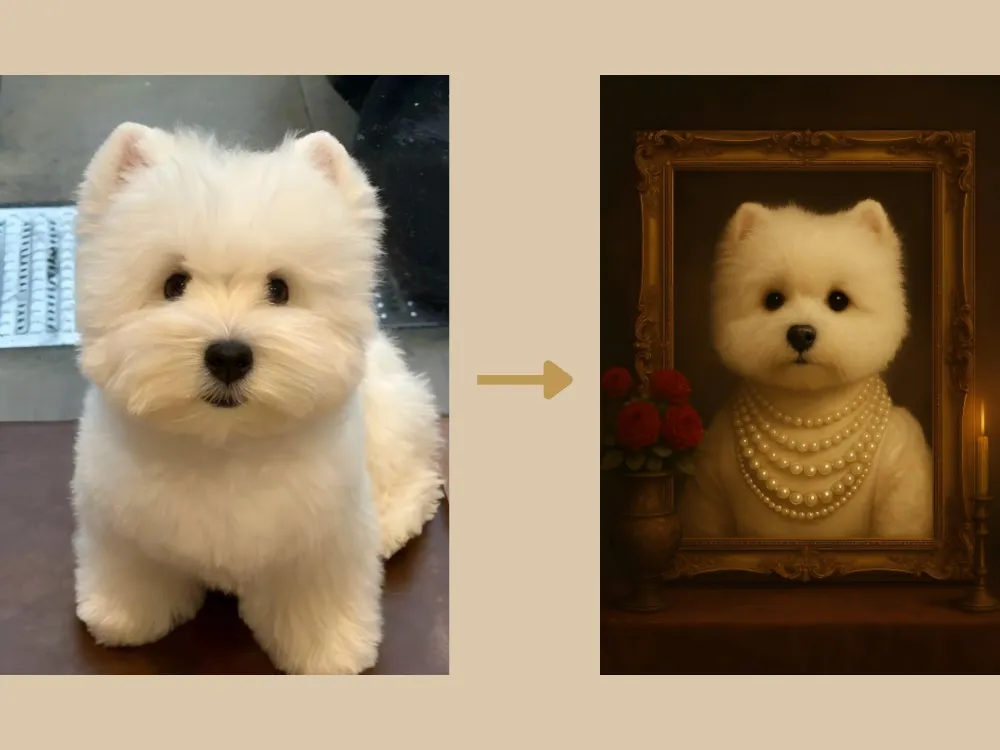
Vintage Pet Prompt: "Adorn the pet in the original image with an elaborate 18th-century noblewoman's pearl necklace. Set the background in a lavish, candlelight-lit portrait studio, while maintaining the pet's realistic fur texture and expression. Position a vintage ornate picture frame centrally, with the pet inside it. On the left side of the frame, place an exquisite vintage vase holding a bouquet of red roses. The overall style should be a retro pet portrait."
無料で生成してみましょう →
Cute Pet Prompt: "Maintain the current appearance and face of the pet, rendering a realistic cat. Place the cat in an outdoor scene on sunlit grass, wearing a collar made of flowers and greenery, and surrounded by yellow, green, and white fresh flowers. The overall image should be fresh and vibrant. An oil painting stands upright behind the cat, featuring the same cat against the identical grass and flower background."
無料で生成してみましょう →
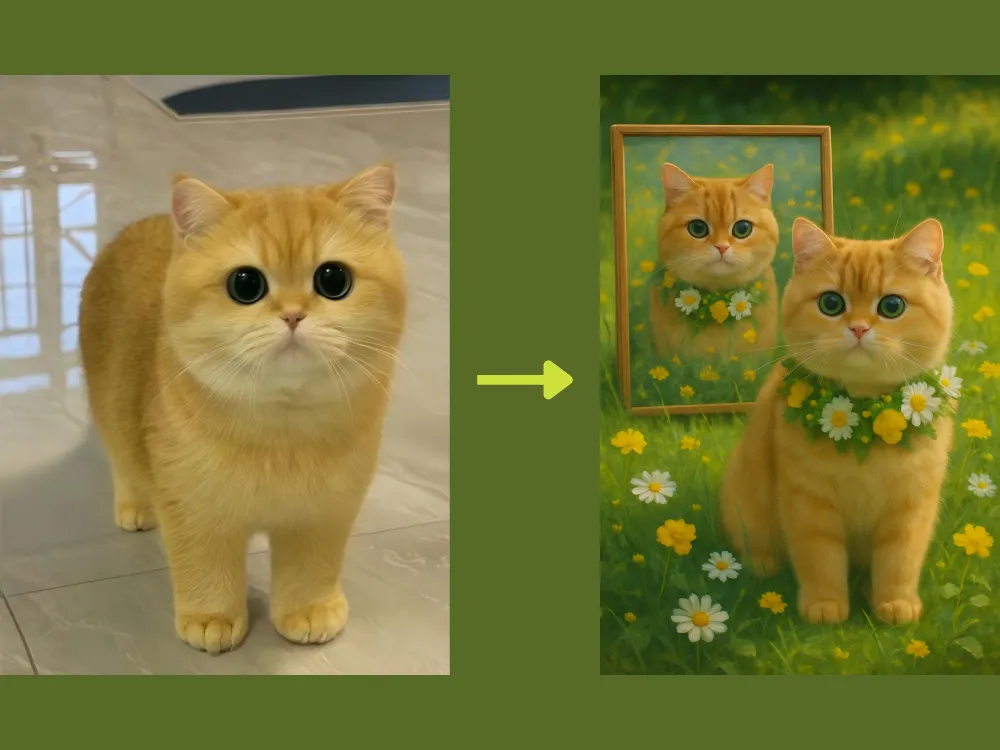
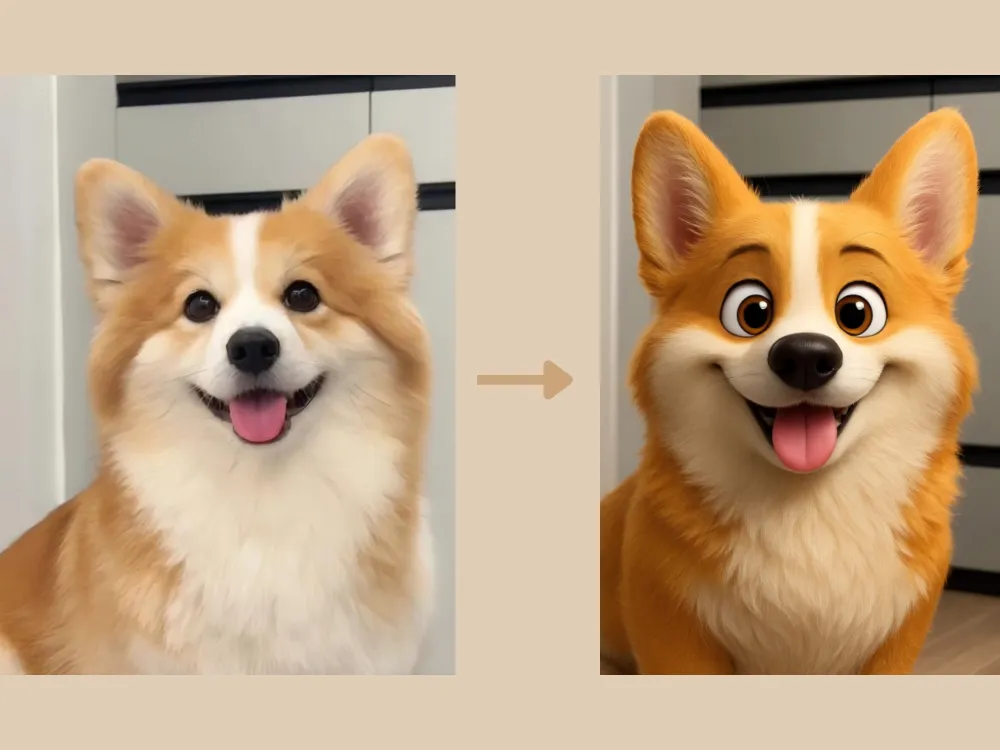
Photo to 3D Prompt: "Transform the pet in the original image into an ultra-detailed 3D cartoon style, similar to an IP character/mascot. Ensure the realistic texture of the fur is maintained, and pay close attention to preserving the pet's detailed facial features from the original image."
無料で生成してみましょう →
GPT Image 2編集プロンプト:結果を安定させる書き方
GPT Image 2では、「編集したい内容」と「残すべき要素」を同時に書くと結果が安定します。何を変えるか、何を変えないか、最終画像をどこで使うかを明確にしましょう。
GPT Image 2プロンプト例
汎用クリーンアップ:「この画像をより清潔でプロフェッショナルに編集してください。被写体、ポーズ、顔の特徴、カメラアングル、構図は変えないでください。光を改善し、小さな邪魔物を取り除き、色を整え、自然でリアルな仕上がりにしてください。」
SNS用画像:「この画像をSNS投稿向けのビジュアルにしてください。主役は変えず、コントラストと色を改善し、背景をすっきりさせ、短い見出しを入れられる余白を残してください。」
ブログサムネイル:「この画像をブログサムネイル向けに整えてください。被写体は認識できるままにし、背景をシンプルにし、光を改善し、片側にテキスト用の余白を作ってください。画像内に文字は入れないでください。」
ChatGPTで背景を変更するプロンプト
背景変更は、ChatGPT画像編集の中でも検索意図が強い用途です。良い背景変更プロンプトには、新しい環境、光の向き、影、被写界深度、残すべき要素を含めます。
コピーして使える背景変更プロンプト
スタジオ背景:「現在の背景を、清潔でニュートラルなスタジオ背景に置き換えてください。被写体は完全にそのままにし、髪の輪郭と服の細部を保ち、柔らかく自然な影を追加してください。」
ライフスタイル背景:「背景を、柔らかな自然光が入る明るいモダンなワークスペースに変更してください。人物の顔、ポーズ、服装は変えず、新しい部屋の光に自然になじませてください。」
商品背景:「背景を高級感のあるEC商品シーンに置き換えてください。商品の形、ラベル、色、素材は正確に保ち、控えめな影と清潔な台面を追加してください。」
人物レタッチ用プロンプト
人物写真では、過度な加工よりも自然な改善が重要です。本人らしさ、肌の質感、顔の形、表情を保つように明記してください。
コピーして使える人物レタッチプロンプト
自然なレタッチ:「このポートレートを自然にレタッチしてください。人物の identity、顔の形、表情、肌の質感は保ってください。小さな肌トラブルを軽く整え、強い影を柔らかくし、目を少し明るくして、作り物に見えない自然な仕上がりにしてください。」
プロフィール写真:「この人物写真をプロフェッショナルなプロフィール写真に編集してください。人物が同じ人だと分かるように保ち、光を改善し、背景を整理し、顔を少しシャープにしてください。LinkedInやチーム紹介ページに使える雰囲気にしてください。」
クリエイティブポートレート:「このポートレートを映画的な編集写真にしてください。同じ人物とポーズを保ち、柔らかいドラマチックな光を加え、背景を少し暗くし、雑誌風の洗練された見た目にしてください。ただし顔立ちは変えないでください。」
EC商品写真向けプロンプト
商品写真では正確さが最優先です。商品の形、ラベル、色、素材、比率を守りながら、周囲の環境だけを整えるように書きましょう。
コピーして使える商品写真プロンプト
商品画像クリーンアップ:「この商品写真をEC掲載用に整えてください。商品は完全にそのままにし、背景の散らかりを取り除き、光を改善し、柔らかな自然な影を加え、白または薄いグレーの清潔な背景に置いてください。」
高級感のある商品シーン:「この商品写真から、プレミアムなライフスタイル商品画像を作成してください。商品のラベル、形、色は正確に保ち、ミニマルで現代的なシーンに配置し、広告コピー用の余白を残してください。」
広告クリエイティブ:「この商品写真をSNS広告向けのビジュアルにしてください。商品は正確に保ち、ブランドに合う清潔な背景を追加し、コントラストを強め、見出し用の余白を残してください。文字は入れないでください。」
ChatGPT画像編集で良い結果を出すコツ
- 編集内容を明確にする:背景変更、人物レタッチ、光の調整、不要物削除、商品写真整理、スタイル変換など。
- 変えない部分を書く:顔、商品ラベル、ポーズ、服装、カメラアングルなど。
- 用途を決める:プロフィール写真、EC商品画像、ブログサムネイル、SNS広告、プレゼン資料など。
- 曖昧な表現を避ける:「もっと良く」ではなく、光、背景、色、構図を具体的に書きます。
- 一度に一つだけ直す:最初の結果を見て、次は一つの問題だけを修正します。
FAQ:ChatGPT画像編集プロンプト
ChatGPTで写真を編集する一番良いプロンプトは?
編集内容、変更する範囲、残すべき部分、最終スタイルを明確に書くプロンプトです。例:「背景を清潔なスタジオ背景に置き換え、被写体は変えず、髪の輪郭を保ち、光を合わせ、自然でリアルにしてください。」
ChatGPTで画像の背景を変更できますか?
できます。新しい背景、光、影、残すべき要素を書いた背景変更プロンプトを使うと安定します。より編集向きのワークフローには iMini GPT Image 2 を使えます。
GPT Image 2 promptsはどう書けばいいですか?
単なるスタイル説明ではなく、編集指示として書きます。タスク、被写体、残す部分、光、背景、出力形式、避けたい問題を含めてください。
AI編集画像の中に文字を直接入れるべきですか?
通常はおすすめしません。スペル、多言語対応、デザイン調整のため、画像は文字なしで生成し、最終コピーはデザインツールで追加する方が安全です。
さらに詳しいモデル別の例は、GPT Image 2 vs GPT Image 1 と Best Gemini Omni Prompts も参考にしてください。
まとめ
ChatGPT画像編集プロンプトの活用範囲は、上記の例をはるかに超えており、多様なビジュアルの編集・変換・制作において強力な手段となっています。ワークフローを効率化し、より洗練された成果を手軽に実現するには、iMini AI のChatGPT画像生成ツールをぜひお試しください。クリエイティブな画像編集をより速く、スマートに、より身近なものにするために設計されています。